- Type
- Audio Effect
- Author
- Bert
- Version
- 1.1
- License
- None
- Live version
- 9.0.5
- Max version
- 6.1.3
- Downloads
- 910
- Updated
- 2013-09-06
Konditioner is an Audio Effect for Ableton Live by Bert, distributed as freeware, with no license specified by the author. It targets Live 9.0.5 and Max 6.1.3. On maxforlive.com it has 910 downloads. First published 2013-09-03, last updated 2013-09-06. 11 user comments below.
New to Max for Live? Read what Audio Effects do, how device licenses work, how to install a device.
Description
This device was designed for use on stage, where an intuitive use of midi-controllers is important.
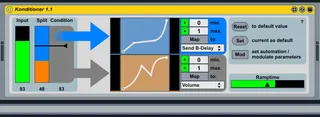
The main purpose is to control two parameters with one midi-controller (but not at the same time!). Which of the two parameters is controlled, depends on the condition-value (which can also be controlled by a midi-controller).
When using several instances of this device, you can have great control over various parameters with a small number of controllers!
There's also a feature, which enables you to make the values change automatecaly to a target value.
Setup/Howto:
- Map a midi-controller to the input value-slider.
- Map a midi-controller to the condition-slider.
- Set a split value. This determines depending on which values of the condition-slider, the input values are routed on to the orange or blue output.
- Press the "Map"-buttons to map the orange or blue value to any parameter in ableton live. Depending on what parameter you map it to, set the min. & max. boundaries.
- start changing the values
- Press "Reset" to reset the values to a default value (usually = 0).
- Press "Set" to make the current values the default ones.
- When "Mod/Set" is active, the incomming values are not passed through but buffered until the "Mod/Set" is deactivated. Then the previous values gradually automate to the last set value. The automationtime can be set with the slider "Ramptime" (it is quantized to the durations: 2Bars, 4Bars, 8Bars)
- Use the graphs to shape the values. (hold shift for a new break-point, hold alt to shape the curves from linear to exponential)
Changelog:
1.1:
- you are now able to set the output Min./Max. manually
- Dropdown menue shows the mapped parameter
For feedback and suggestions: [email protected]
Comments (11)
Now if both a blue and orange set of values can be mapped to 2 parameters, and it takes one control to set the value and the other to switch whether blue or orange is sending midi, what then makes this devise unique over setting up an x y on a 2 d pad or setting up 2 faders and controlling those two values directly?
Cheers to you
In fact the benefit of the device increases if you use several controllers & devices. e.g. I personaly use it like this:
I have a Korg MicroKontrol. I mapped the Midi CC of the Joystick to the Input value of several devices. Then I mapped each Pad of the Microkontrol to the Condition-Parameter of each device. The Pads are "gating" the Joystick's CCs - so to speak. Now I can control several of Lives parameters with just the joystick, depending on which pad I press. Furthermore I can capture a certain state of one of Lives parameters by pressing a pad - thus changing from blue to orange signalpath.
(In fact I use a custom made m4l device which incorporates the function of this device several times, but its basically the same)
Thanks for the Feedback and please ask, if there is still something unclear!
Bert
That was certainly helpful.
I have a MicroKontrol as well. I'm assuming you chose a single axis of the joystick (and maybe set a default value to snap back to) for all instances of the Konditioner. Or maybe you used the stick in the independent x,y for 4 separate input values?
The thing is, with the later assumption there's that issue with scalability again. And with my first assumption, wouldn't you nonetheless be changing values for the condition state of every instance of your Konditioner? You'd have a sequence of devices in either an orange or blue position at any point in time, and therefore the one MIDI CC of the joystick would be controlling all of them, right?
Unless by "gate" you mean you are not assigning the orange state (or the blue for a "reverse gate"), such that when the pressure or velocity or whatever variable control you assigned to the condition, falls below the blue/orange delineation ("threshold"), the blue is no longer being controlled. But you could create a similar result with the envelope curve of the assignment, right? So I'm afraid I am not correctly understanding how you have things set up.
The pads themselves are not gating the input, only toggling which assignment is being controlled. The pads NOT being touched are sending MIDI info as well, if you have the same input assignment.
And by capturing a state, do you mean simply that by changing the condition state then the last parameter moving will remain at its last value until the condition changes back to it?
Without giving away your magic on stage, maybe a real case scenario-the actual parameter types that you like to work with in an example-would shed some light. Does this ultimately become an expression control for you? A utility moving around the signal flow? Are you using Track data-notes/velocity to control the condition, or are you sending sound through the same track? Or is the device working as a remote?
So far,
I tested the scalability of the konditioner by putting 4 instances into 4 chains of an instrument group with no regard to the chain selector. I'm just using the track to influence other parameters.
I assigned the input selector of each Konditioner to that one MIDI CC as you suggested, and then used 4 pads in toggle mode to switch from orange to blue. I could not think of an application where having aftertouch or velocity information would help me decide which of the two conditions I really wanted to send data out to, and therefore tried a toggle behavior. Unless I was using an envelope follower or an LFO, where would you find the full range of the Condition slider useful? It's either one or the other, right, so a button could work as well, no?
Then I tested the autonomy of the controls by setting all the pitch values of a single Resonator plug-in.
Upon moving the one MIDI asignment for the input, each of the Konditioners in sequence move either in their orange or blue curve.
I do appreciate your keeping the office doors open, so to speak!
James B
I am glad about your interest in my device. I am not sure, if I understand everything corrctly (I'm not a native speaker). Maybe some basic points first:
The device is not meant to do anything with audio signals. It's just an audio device, so you could put it on just any track you like (no matter if its an audio-/instruments-/return- or even master-track. In fact you could just put it on any track, to control a davices parameter, which is on a completely different track.
What "issue with scalability" do you mean?
"Unless by "gate" you mean you are not assigning the orange state (or the blue for a "reverse gate"), such that when the pressure or velocity or whatever variable control you assigned to the condition, falls below the blue/orange delineation ("threshold"), the blue is no longer being controlled."
- yes, tahts how I mostly set it up!
"But you could create a similar result with the envelope curve of the assignment, right?"
- I guess you think of setting the envelopes in a way, so you just send out data on the inputs "second half" for example? That wouldnt be the same, because you wouldnt have the garantee, that you do not control any other perameter at the same time.
"The pads themselves are not gating the input, only toggling which assignment is being controlled. The pads NOT being touched are sending MIDI info as well, if you have the same input assignment."
- I dont know how the pads not being touched could send out Midi? Well, I set up my Microkontrol's Pads to work as buttons not as toggles.
"And by capturing a state, do you mean simply that by changing the condition state then the last parameter moving will remain at its last value until the condition changes back to it?"
- yes exactly (maybe I described it a little too complicated).
"where would you find the full range of the Condition slider useful?"
- actually I also just use it with toggle behavior. I just imagined, that the slider would represent the action more demonstratively. Maybe it would make more sense, if you could "blend" from orange to blue state? But I guess this would be even more confusing. What do you think?
I guess, I'll have to make a video for further explanation. but wont be able to do so, before next month, because I'm travelling right now. So I hope this was a little helpfull, and again: dont hesitate to ask, if there are still questions!
I'll put my thinking cap on and figure out scenarios where one might wan the full "blend" from Orange to Blue.
Cheers,
James
Any new ideas? If you want you can also send me an email to my address above!
best regards
Bert