Safe Push Performance
This device allows you to disable potentially dangerous or u...
- Type
- Audio Effect
- Author
- Because789
- Version
- 1.2
- License
- None
- Live version
- 9.0.5
- Max version
- 6.1.3
- Downloads
- 2,156
- Updated
- 2013-10-17
Safe Push Performance is an Audio Effect for Ableton Live by Because789, distributed as freeware, with no license specified by the author. It targets Live 9.0.5 and Max 6.1.3. On maxforlive.com it has 2,156 downloads. First published 2013-09-09, last updated 2013-10-17. 10 user comments below.
New to Max for Live? Read what Audio Effects do, how device licenses work, how to install a device.
Description
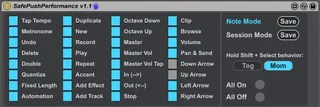
This device allows you to disable potentially dangerous or useless buttons on Push during a live performance.
Set up:
- load the device to a hidden place in your set (initially all buttons are enabled)
- disable (toggle off) the buttons you want to secure in Note mode
- click the Save button behind "Note Mode"
- disable the buttons you want to secure in Session mode
- click the Save button behind "Session Mode"
(note: All On/All Off just set the state of all buttons but hasn't an effect on the presets until they are saved)
- choose if you want to use "Hold Shift + Select" as toggle ("Tog") or momentary ("Mom") switches
- save with your live set
Features:
- when switching between Note and Session mode, the previously saved presets will be loaded
- hold Shift + Select allows you to temporarily enable buttons:
- in momentary mode they are enabled as long as you hold "hold Shift + Select"
- in toggle mode they are enabled until you press "hold Shift + Select" a second time OR until you switch mode (Note/Session)
- if you navigate to the device you can enable the buttons one by one with the knobs on Push, but the states will be overwritten as soon as you press Note, Session or hold Shift + Select
Limitations:
- the device assumes that Push is running and properly set up/connected to Live
- it only works in Push default mode (User mode scripts like PXT-Live are not affected)
ATTENTION: enable all buttons before you delete the device from your set!!! ([closebang] is still not working properly with Push)
Release notes:
----------------
v1.2
- temporary switches between session and note mode by holding Session or Note button are now respected
v1.1
- added more controls to disable: Clip, Browse, Volume, Pan & Send, Up, Down, Left, Right Arrow
- Note Mode and Session Mode text change now color according to the mode you are in
v1.0
- initial release
Comments (10)
- load device, keep all buttons enabled and press the Save button behind "Session Mode"
- disable Up/Down Arrow and click Save behind "Note Mode"
When you then switch between session and note mode you'll have what you want. Use hold Shift + Select to enable the buttons momentary if needed.
Btw: Sometimes the presets are not recalled properly when you save a set with the device in, close and open it again (it might be a m4l bug, but I have to investigate more). That's very annoying, but during a session it shouldn't be a problem. Justs make sure to check the setting on the device after you opened a set...
hey, I was wondering if you think it would be possible to disable arbitrary scene launch buttons in Session mode? in my live rig, the bottom three scenes are full of misc clips that should never be launched as a scene, but I have accidentally launched those scenes a few times when trying to quickly launch a nearby clip... I would love to be able to disable the bottom three scene launch buttons!
thanks for building this, it's getting active use in live performances. :D
maybe a feature worth considering for the next version?
No more! Thanks heaps!
Is this device still working. I have attempted to set it up, loaded it on a track (tried midi and audio), disabled Delete for both note and session modes, saving each time. But I am still able to delete. Am I missing something in the set-up?