- Type
- Audio Effect
- Author
- Bert
- Version
- 1.1
- License
- None
- Live version
- 9.0.5
- Max version
- 6.1.3
- Downloads
- 1,308
- Updated
- 2013-09-05
FX-Randomizer is an Audio Effect for Ableton Live by Bert, distributed as freeware, with no license specified by the author. It targets Live 9.0.5 and Max 6.1.3. On maxforlive.com it has 1,308 downloads. First published 2013-09-04, last updated 2013-09-05.
New to Max for Live? Read what Audio Effects do, how device licenses work, how to install a device.
Description
+++ ATTENTION +++
I updated this device to the Smart-Randomizer device
(http://www.maxforlive.com/library/device/1893/smart-randomizer)
I decided to leave this device in the library, since it might be enough for most tasks.
+++ ATTENTION +++
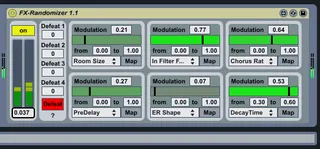
In my live-performance-setup I did not want to use the same FX-setting all the time. But I also did not want to bother about setting all the numerous parameters of an effect during a live performance. So this device enables me to have different effect settings each time I use the effect. It modulates any parameter of live or a plugin. Put it behind the modulated effect/instrument and as soon as there's audio coming out, the modulation stops!
When used with insert-effects I assign the same midi-controller which controls the effects dry/wet parameter also to one of the devices "defeat" parameters. So as soon as the dry/wet value is above zero the modulation stops.
Setup:
- put this device behind the effect/instrument you want to be randomized
- assign the modulations (if 6 modulation is not enough for you, just put a second device in the chain / modulating macros of an instruments-or effectsrack may do the trick also, since you can assign one macro to several parameters)
- set the min. & max. for the modulations.
- If used behind an instrument or send effect turn on the Input (this will defeat the modulation on audio-input)
- when used on a send effect / return channel, it may also be a good idea to assign the same mici-controller which controls the send levels to this return to the defeat-parameters. Otherwise the modulation stops just shortly after any audio is comming in, resulting in a short glitch noise.
For feedback and suggestions: [email protected]