multi-stage-clips
This device was made with the same purpose in mind than V.1....
- Type
- Audio Effect
- Author
- Bert
- Version
- 2.3
- License
- None
- Live version
- 9.0.5
- Max version
- 7.0.
- Downloads
- 795
- Updated
- 2015-11-17
multi-stage-clips is an Audio Effect for Ableton Live by Bert, distributed as freeware, with no license specified by the author. It targets Live 9.0.5 and Max 7.0.. On maxforlive.com it has 795 downloads. First published 2013-09-07, last updated 2015-11-17. 6 user comments below.
New to Max for Live? Read what Audio Effects do, how device licenses work, how to install a device.
Description
This device was made with the same purpose in mind than V.1. of the multi-stage-clips device (http://www.maxforlive.com/library/device/1861/multi-stage-clips). But since it utilizes a very different workflow, I decided to upload both. Each of them may suit your needs better, depending on the circumstances.
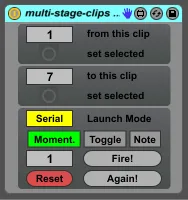
The device enables you to launch any given number of clips in a track in series or randomly by just repeatedly pressing one button.
How to:
- Put the device on the track, whiches clips you want to launch.
- Choose the first and the last clip. You can just enter their scenes number in the device or click on the clip an click "set selected" in the device.
- Click the "Fire!" button to start the first clip. Every time you click again, the next clip in the row is launched. after the last clip is launched it starts again from the first.
- Assign a midi-controller to the "Fire!" button. Depending on the kind of controller you may switch the Compatibility mode (for those controllers sending note-off messages (like keys or switches) and those which do not).
- Switch to "Random" mode and the Clips will be launched in random order. (No clip will be launched twice until every other clip was launched).
- You can use multiple instances of the device on the same track, controlling different ranges of clips (also overlapping).
- You can manually set the next clip to be launched in the numberbox next to the "Fire!" button.
- Click "Reset" to set the first clip the next to be launched. ATTENTION: this applies to every instance of the device in you live set.
- There are three compatibility modes for different kinds of midi-controllers mapped to the "Fire!" button:
1. momentary buttons sending Midi-CCs
2. toggle buttons sending Midi-CCs
3. buttons sending note-values
- For visual Feedback on your midi controller you may setup an extra dummy-clip for each set of "multi-stage-clips".
You can find a explanation video here: https://vimeo.com/146002390
For feedback and suggestions: [email protected]
Changelog:
2.3:
- reworked compatibility-mode switch. now there are three modes depending on the kind of midi-controller mapped to the "Fire!" button.
2.2:
- minor cosmetic changes
2.1:
- added "Again!" Button to fire the last played clip again
- fixed bug in the random-order feature
- reset-button is now midi controllable
Comments (6)
best regards, Bert
Is there any way to have it trigger clips within a range based on the selected clip, rather than a clip at a specified scene? This way you could have versatility for live performance, where one midi pad could dynamically control sequences throughout the set.
Also, an option for firing at on-action and off-action of pad?
Thanks, noah
or you create a dummy clip sending midi-controls to change the range of clips.
Works as a studio arrangement tool or in a live performance.
Great work Bert.
and thank you for this wonderful tool !
Is there a way to change the audio output to a midi one ? So we could send multiple tracks to the same vst ?