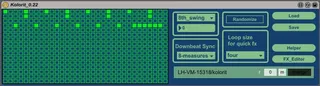
Kolorit --- drumsequencer for monome
Hi everyone 0.22: http://ul.to/mydkm20d 0.1: http:...
- Type
- MIDI Effect
- Author
- novasnoa
- Version
- 0.22
- License
- None
- Live version
- 9.0.5
- Max version
- 6.1.3
- Downloads
- 1,281
- Updated
- No Updates
Kolorit --- drumsequencer for monome is a MIDI Effect for Ableton Live by novasnoa, distributed as freeware, with no license specified by the author. It targets Live 9.0.5 and Max 6.1.3. On maxforlive.com it has 1,281 downloads. Published 2013-09-21. 9 user comments below.
New to Max for Live? Read what MIDI Effects do, how device licenses work, how to install a device.
Description
Hi everyone
0.22: http://ul.to/mydkm20d
0.1: http://ul.to/guw50jif
I made the drum sequencer i was always dreaming of:
It has:
A interactive help (for everyone who doesnt want to read further) It will follow the presses on the monome and explain what is
on each window behind the buttons.
32 steps
16 patterns (drumsounds)
64 parts (presets)
You can adjust per step: (all of this directly on the monome)
* The sound it plays on each step (each of the 16 drum pads has 8 sounds in it, you can choose them on the monome)
You can also choose more then one and it will randomly trigger them
* Velocity (you can set also a range in which it will randomize the velocity)
* probability of the sound to be played
You can adjust per pattern (drumsound:
The three things above (it will then be set for all steps on this pattern
* the speed (8n, 16n, 32n, 16nt and 8nt) You can have different speeds in the same sequence
* the length (also here, different length for the pattern of each drumsound are possible)
* downbeatsync (each uneven pattern can be either free or automaticly synced after a certain time)
* mute, each line can be muted, if you change the part the pattern will go to the saved mute state of the part
Other functions:
* There are many ways to copy, from pattern to pattern, part to part, single pattern from one to another part.
* There is a delete function
* There are 4 envelopes for each of the 64 parts, those enevelopes can control one of 32 effect-parameters you can set on the app itself. (this enevelopes can be fully set and controlled from the monome)
* There is a clever pattern mixer, you can have for example 8 complete drumrythms, and mix them now very simply.
(play bassdrum from part one snare from part two and so on) Its really fun to remix on the fly while it is playing!
* There is a pattern Sequencer, where you can create sequences out of all the pattern you have (up to 1024)
Those sequences can be played in a very simple way
* There is a midi mlr, with some special functions (you can decide which of the 16 drumsounds should be affected by your presses.
E.g. you could deselect the bassdrum - it will now keep on playing - while you stutter around with the rest.
(its fun to make loop here and select and deselct sounds in this loop)
You can mute sounds directly in the mlr
You can see each of the 16 patterns on the grid - to navigate better to the steps where they actually play)
you can record the performance you do with the mlr, directly into parts ( in up to 8 parts can be automatically recorded for a up to 16 bar long performance) Those parts are then fully editable.
* You have a very easy way to trigger audio effects like stutter edit, record a performance with them and bind this recording to a part, so it will always play when you start this part.
* You can save everything into one textfile (was not easy i had to merge 20 colls into one when saving and separate them again when loading)
* there is adjustable 8 and 16 swing
* usable for a 64, 128 and 256. (bigger monomes have on each of the additional 8x8 grids the option to open either
the pattern mixer, the mlr, the pattern sequencer or the fx-envelope)
I have created lots of videos:
If you want to have a nice impression first watch mlr and pattern mixer
Overview:
http://www.youtube.com/watch?v=ggneL8R5zcU&list=PL_TOQazf-ngx5kkiqQm48hdC77eCzYx_p
Helper:
http://www.youtube.com/watch?v=fk2BAUDbhXU&list=PL_TOQazf-ngx5kkiqQm48hdC77eCzYx_p
Pattern Mixer:
http://www.youtube.com/watch?v=0VOe6eVb9KA&list=PL_TOQazf-ngx5kkiqQm48hdC77eCzYx_p
Pattern Sequencer:
http://www.youtube.com/watch?v=B1_rzzI-4CI&list=PL_TOQazf-ngx5kkiqQm48hdC77eCzYx_p
Quick Fx:
http://www.youtube.com/watch?v=G63ozL0P460
FX Editor how it works with states and the Quick FX page on the monome:
http://www.youtube.com/watch?v=OFxMeZVzDtM&list=PL_TOQazf-ngx5kkiqQm48hdC77eCzYx_p
Fx Envelope:
http://www.youtube.com/watch?v=bvc_dx5cW_4&list=PL_TOQazf-ngx5kkiqQm48hdC77eCzYx_p
FX Editor how it works with the Envelopes on the monome:
http://www.youtube.com/watch?v=8f4J9Zy0m0M&list=PL_TOQazf-ngx5kkiqQm48hdC77eCzYx_p
MLR:
http://www.youtube.com/watch?v=LFiMacBMIdk&list=PL_TOQazf-ngx5kkiqQm48hdC77eCzYx_p&index=9
The Kolorit midi send is actually not sending but receiving the midi data from the quick fx page, just put it in a empty midi track and point the output of the miditrack to a plugin like stutter edit. (a plugin which is controllable via midi notes)
Comments (9)
I am looking forward to testing it :-)
http://www.sigabort.co/m4l_lp.html
this one is great and pretty simple
Keep It Spinnin'
Mike Bosch
Might be good to look into this to make the device more stabile, but still great device. I love it.
Thank you for the great sequencer, I was looking for something like this for my live performance and you have created what I was looking for.
Do you have any idea's how I could get it to run in Max 5?
I really don't want to upgrade as I hate live 9 and can't afford Max 6.
Im a little late but better late than never!
Im using the monome 256 and it works perfectly..BUT:
As soon as i turn down the Buffersize to 128 or lower there are audio dropouts even in a nearly empty project with only 3%CPU. Turn on a testOSC on another track to hear it clearly.
Im syncing a modular system via ADAT and the dropouts mess up the timing but this sequencer is the best thing that happened to me since i got the monome and i don't want to give it up :)
Any thoughts?
THANKS!