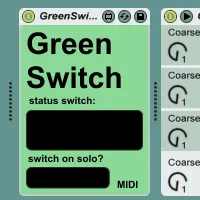
Green Switch MIDI
Green Switch is a Max for Live device that automatically tur...
- Type
- MIDI Effect
- Author
- Jdudeo
- Version
- 3.0
- License
- Attribution
- Live version
- 9.0.5
- Max version
- 6.1.3
- Downloads
- 4
- Updated
- 2013-10-15
Green Switch MIDI is a MIDI Effect for Ableton Live by Jdudeo, distributed as Creative Commons Attribution. It targets Live 9.0.5 and Max 6.1.3. On maxforlive.com it has 4 downloads. First published 2013-09-20, last updated 2013-10-15. 13 user comments below.
New to Max for Live? Read what MIDI Effects do, what the Attribution license means, how to install a device.
Description
Green Switch is a Max for Live device that automatically turns off all devices within a track when that track is deactivated (i.e. muted), saving you CPU usage and money spent on electricity, along with a little bit of the planet along the way.
To use a Green Switch, simply place it in your track. When the track is deactivated, it will turn off all the track’s devices. When the track is reactivated, it will restore all devices to their previous states, so any devices that were off before will still be off but any devices that were previously on will be turned back on.
Green Switch v.2 includes an option that accommodates Ableton's solo function, turning off all devices of all tracks except the track that's soloed.
Green Switch v.3 adds a function to turn off all devices within a track without muting the audio.
If your track is already deactivated when you insert a Green Switch, it will automatically turn all your devices off to reflect the track’s state, but will restore your devices when the track is activated.
There is a MIDI version for MIDI tracks and an audio version for audio tracks.
Comments (13)
Could i suggest the same version but for the SOLO switch ?
(i mean : you push SOLO on one track, all devices on all others tracks switchs off)
Let me know if you do that, it would be usefull for me and i'm not yet a M4L programer
Thank you guy !
Thanks for your comment! I'm glad you like my device.
About the solo switch, that's an interesting suggestion, I'll look into it and will comment here again if it seems possible.
I've included the solo function in version 2 of the device which you can download from the same page as before, enjoy!
Let me know if you run into any problems or want to request another feature.
"Basically, looking for a way to automated solo button information, a major request of Ableton users for a decade!!"
I think this would be good as a separate device, I've never had a need to automate the solo function and I don't know why Ableton don't include it but it really shouldn't be that difficult to do, I'll try to knock something up in the next week or so!
Thanks so much for responding. I love the device. I did download the audio and midi track versions. I've even set them on default midi and audio tracks ;)
Most daws record automation of the solo function but Ableton seems to think it will get in the way of using the solo for it's intended function: soloing a track during a mix.
Users have been asking for this feature since Live 1. If you make it happen, you will be a hero among a certain set of Ableton users!
Thanks for the effort. I'll be kind in turn.
Excellent, well I've uploaded a preliminary version of the device that should work in most circumstances. For a full explanation and to download it follow the link:
http://jgarcia.hungry.jp/project/solo-beta/
Let me know how it works out and if it causes any problems!
Thanks so much for this! I'll give it a shot as soon as I can and report back.
sorry for the late reply.
your automation should start working again if you press the "Re-Enable Automation" button that's next to Live's main transport controls.
Green Switch won't overwrite your automation unless you use it when recording with automation arm.
Thanks a lot for this plugs bro'.
Ableton's devs having to include your "solo fucntion" in the news updpate!!