Korg Volca Beats By Michael Walker
Now Available in a pack with my new Volca Bass device! ...
- Type
- MIDI Effect
- Author
- mikerez
- Version
- 1.0
- License
- None
- Live version
- 9.0.5
- Max version
- 6.1.3
- Downloads
- 2,447
- Updated
- 2014-10-21
Korg Volca Beats By Michael Walker is a MIDI Effect for Ableton Live by mikerez, distributed as freeware, with no license specified by the author. It targets Live 9.0.5 and Max 6.1.3. On maxforlive.com it has 2,447 downloads. First published 2013-09-21, last updated 2014-10-21. 10 user comments below.
New to Max for Live? Read what MIDI Effects do, how device licenses work, how to install a device.
Description
Now Available in a pack with my new Volca Bass device!
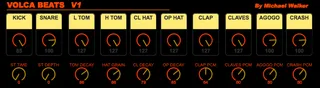
This is a MAX 4 Live MIDI device that I made that gives you individual Volume and PCM control of your Korg Volca Beats using the Akai APC, Ableton PUSH or any generic MIDI controller.
You can also control Stutter Time and Depth, Tom Decay, Hat Grain, CL Hat and OP Hat Decay too so much of the editing can be done either with a mouse or using a controller without wearing out your Volca Beats!
The Volca does not transmit or receive velocity information so you can not add accents to beats using the machine alone but, you can use this device to record or draw Volume parameters using Envelopes in Ableton Live!
Each control is Auto Mapped to the APC 40 (and should be using PUSH) so you can simply drag it onto the MIDI track you wish to use with your Volca Beats and away you go!
Its a good idea to use the 'External Instrument' device in the Instrument category in Live, simply drag this onto a MIDI track set your 'MIDI To' to channel 10 (default Volca Beats setting) and then choose the audio input on your computer or sound card that you have the Volca Beats Audio out plugged into.
You will also need to have a MDI cable connecting your computer (via a MIDI Interface) from MIDI OUT to the Volca beats MIDI IN.
I hope all Volca Beats users find this device fun and useful I'm sure you will, its totally free but donations via paypal are very welcome using the link :)
Enjoy
Michael
Comments (10)
http://www.maxforlive.com/library/device/1965/korg-volca-keys-remote
Can you program a patch for the volca Bass,please?
My wish is(I dont understand Max4Live) a full m4lPatch for the volca bass with all Midi CCs(nerk2´s has not all CCs supported)
My idea was to add an Accent like on the tb303.
It would be wonderful if there is an Accent knob(or auto detect Velocities over 100) with definable parameters (which are used for the accent) for example like: eg attack(cc46) with CUTOFF EG INT(cc48) and gate time shortened cc(49) or so.
Here is the midi chart: http://www.korg.com/uploads/Support/USA_volcabass_MIDI_Chart_E.pdf
If it makes no great afford, Song Position an all notes off are also intresting.
For a further version i suggest a Launchpad mapping
for user 1 or 2 mode.
Thanks in forward.
Please program, i love the volca bass.
The Keys job by Nerk2 is a great job, god one bro! :)
I was in the process of building one myself when I came across yours here..
I have a quick question..while I was scanning the midi implementation chart from Korg's site I noticed no CC control for Kick and Snare parameters other than level - also the lack of Tom pitch control.. is this a limitation on the korg machine or is there a way to get control some other way?
Thanks again
Enjoy:
Agogo (G3) Claves (D#4) Alt Claves (crossover)
0 C1 (sharpish) Db2
1 G1 Ab2
2 B1 C3
3 C2 E3
4 D2 (sharpish) G3
5 E2 (sharpish) A3
6 Gb2 (sharpish) C4
7 Ab2 (sharpish) D4
8 Bb2 (sharpish) Eb4
9 C3 (sharpish) F4
10 Dd3 (sharpish) Gb4
11 Eb3 Ab4
12 E3 A4
13 F3 Bb4
14 Gb3 B4
15 G3 C5
16 Ab3 Db5
17
18 D5
19 A3
20
21 Eb5
22 Bb3
23
24 E5
25 B3
26
27 F5
28 C4
29
30
31 Gb5
32 Db4
33
34
35 G5
36 D4
37
38 Ab5
39
40 Eb4
41
42 A5
43
44 E4
45
46
47
48 F4 Bb5
49
50
51
52
53 Gb4
54
55 B5
56
57
58 G4 C6
59
60
61 Db6
62
63
64 Ab4 D6
65 A4 E6
66 Bb4 Gb6
67 B4 G6
68 C5 A6
69 Db5 Bb6
70 D5 B6
71 C7
72 Eb5 D7
73 E5 E7
74 Gb7 Gb7
75 F5 Ab7 Db7
76 Gb5 Bb7 F7
77 Db7 Ab7
78 G5 E7 B7
79 D7
80 Ab5 Eb7
81 F7
82 A5 Gb7
83 G7
84 Bb5
85
86 B5
87
88 C6
89
90 Db6
91
92 D6
93
94
95
96 Eb6
97
98
99 E6
100
101
102 F6
103
104 Gb6
105
106
107 G6
108
109
110
111
112 Ab6
113
114
115
116
117 A6
118
119
120 Bb6
121
122
123
124
125
126
127 B6
As im learning M4L im thinking of new and different things to add to these devices to make them more fun, creative and easy to use.
Its donation only (yeah booo!) but its only £1, but I need funds for the Volca Keys. Plus if you donate I will send any funders the Volca Keys device plus future updates for free :)
Thanks for your support,
Michael