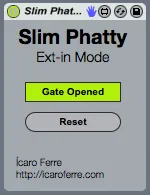
Slim Phatty Ext-In Mode
Keep the gate of the Moog Slim Phatty open while you use it ...
- Type
- MIDI Effect
- Author
- IcaroFerre
- Version
- 1.0
- License
- AttributionNonCommercialNoDerivatives
- Live version
- 9.0.5
- Max version
- 6.1.3
- Downloads
- 465
- Updated
- No Updates
Slim Phatty Ext-In Mode is a MIDI Effect for Ableton Live by IcaroFerre, distributed as Creative Commons Attribution-NonCommercial-NoDerivatives. It targets Live 9.0.5 and Max 6.1.3. On maxforlive.com it has 465 downloads. Published 2013-09-30. 2 user comments below.
New to Max for Live? Read what MIDI Effects do, what the AttributionNonCommercialNoDerivatives license means, how to install a device.
Description
Keep the gate of the Moog Slim Phatty open while you use it to filter and distort the signal coming from the external audio input.
It's great that you can feed an external input to your Moog Slim Phatty and use that awesome Moog filter and overload system.
The only annoying part is that, in order to do that, you would have to:
1 - Keep the gate open (by sending a MIDI note or using the Gate CV input)
2 - Turn off all the oscillators (unless you're actually feeding in just an extra one)
3 - Reset the filter cutoff, resonance, KB tracking and overload controls.
This extremely simple device takes care of all of that. Just create a MIDI track, set it to send MIDI to your Slim Phatty and add the device. All you'll need to do then is use an External Audio Effect device to send the audio signal to the Moog and get it back from it.
I made this to scratch my own itch but I hope more people find this useful as well.
Have fun!
Comments (2)