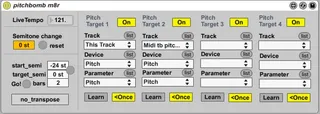
pitchbomb m8r
Pitchbomb is a tool to attach the speed of Ableton Live Midi...
- Type
- MIDI Effect
- Author
- schoolofsound
- Version
- 1.1
- License
- AttributionShareAlike
- Live version
- 9.0.6
- Max version
- 6.1.4
- Downloads
- 4
- Updated
- No Updates
pitchbomb m8r is a MIDI Effect for Ableton Live by schoolofsound, distributed as Creative Commons Attribution-ShareAlike. It targets Live 9.0.6 and Max 6.1.4. On maxforlive.com it has 4 downloads. Published 2013-12-01.
New to Max for Live? Read what MIDI Effects do, what the AttributionShareAlike license means, how to install a device.
Description
Pitchbomb is a tool to attach the speed of Ableton Live Midi tracks to Audio tracks. This may sound unspectacular, but allows previously impossible tape stops and speed ups.
How to:
- Add Pitchbomb amxd to any (Midi) track in the Ableton set.
- Put an audio clip to Repitch mode in clip settings. They need to match pitch-wise, so you might have to bounce your audio.
Percussive stuff like drums can be left in their Drums/Complex/etc mode.
- Add a Midi tracks with synths and match their pitch to the existing audio clips at the given song tempo
- Add a Live "Pitch" plugin to the Midi track
- Click "Learn" in Pitch target 1 and click the Live "Pitch" plugins Pitch knob
- Start fiddling with the semitone change field and do semitone target semitone & bang transitions
Video Demo:
http://youtu.be/va7v_jpAhMw