XVAnalogueFilter Virtual Analogue Filter - Live
XVAnalogueFilter, a Free Analogue (Modelled) Filter device f...
- Type
- Audio Effect
- Author
- xmonsta
- Version
- 91.0
- License
- AttributionNonCommercialNoDerivatives
- Live version
- 9.0.6
- Max version
- 6.1.4
- Downloads
- 4
- Updated
- 2014-07-29
XVAnalogueFilter Virtual Analogue Filter - Live is an Audio Effect for Ableton Live by xmonsta, distributed as Creative Commons Attribution-NonCommercial-NoDerivatives. It targets Live 9.0.6 and Max 6.1.4. On maxforlive.com it has 4 downloads. First published 2013-12-05, last updated 2014-07-29. 15 user comments below.
New to Max for Live? Read what Audio Effects do, what the AttributionNonCommercialNoDerivatives license means, how to install a device.
Description
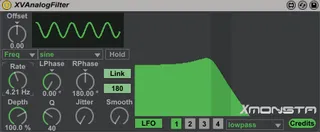
XVAnalogueFilter, a Free Analogue (Modelled) Filter device for Live 9 (Requires Live 9/Max 6)
XVAnalogueFilter, contains a selection of Virtual Analogue Filters, SVF (Zero delay feedback/Linear Trapezoid), Ladder (Moog), Diode Ladder (TB303, or EMS VCS 3) and Transistor Filters created using Gen DSP algorithms (Gen requires Live 9/Max6 in order to work). There are High Pass, Low Pass, Band Pass, Peak and Notch filters. A detailed explanation of each filter in the filter menu can be found in the "Credits" section of the device, along with the licenses and credits for each filter algorithm.
XVAnalogueFilter, is broadly based on Live's own AutoFilter interface, so those familiar with this should feel right at home. There is an LFO section (which includes manual operation), along with an Envelope section (allowing the filter envelope to be triggered by the incoming audio signal). It's possible to adjust the phase of the left and right channels (if you want 0% phase, just set the LPhase (left phase) to 180%, although the filter sounds fatter if you offset them by just a few %). You can also link the phases together and put them 180% phase offset from each other, in order to get tight timing of the LFO to sync with your track.
The device really comes alive when automating the rate of the LFO (try drawing in some automation on the Rate/Sync/NoTrpl/Trpl dials, in 4ths, 8ths or 16ths), while also automating the offset and depth dials. Also the smooth dial can be used to smooth out any fast filter transitions.
I spend a large amount of time testing my devices, so (unlike many maxforlive devices), this device should save properly with your set and you shouldn't experience bugs or errors. All possible dials/parameters are named properly and should be automatable through both session view and clip envelopes. If you do have any problems, feel free to contact me here, or on the forums of http://www.xmonsta.com/forum/home/ and I'll be happy to help.
I've had a huge amount of fun playing around with these warm sounding, squelchy filters for the last few weeks. Hope you enjoy using them as much as I do.
Cheers
Xmonsta
Comments (15)
Seems that the lfo while syncing to host tempo does not not resync to play position it seems to be free running. Only solution to this is to use envleopes on offset and cutoff at the same time. Would be nice to see this fixed but workaround is more than acceptable for this great sound.
Thanks.
Thanks. The LFO is only free running with the "Freq" setting (since the rate is free in Hz, same as AutoFilter), it does resync to host tempo play position, when using the settings "Sync, Trpl, NoTrpl". If you set up a 4 bar loop with any of these settings, the LFO will start at exactly the same position every time you start the loop and throughout the loop. Try also changing the LPhase to 180% to ensure the left and right channels are playing the same LFO settings, so you can hear the synced LFO more clearly (although not necessary).
You can create your own sidechain using the "Envelope Follower" device that comes with the Max For Live Essentials pack.
It's not possible to get a sidechain into this device, because m4l devices cant get audio (for sidechaining) from other tracks (only the track the device resides on). Hence the need for a second device to capture the audio from another track and send the values to another device.
filter 1 is mono
and there's no controls for manual freq modulation?
Manual freq modulation is in the "Man" setting in the dropdown. You can select, Freq (which is free moving), Sync (syncs to ableton) Notrpl (no triplets), Trpl (triplets) and Man (manual).
There are plenty of devices that can help you do this already.
For instance, we have MidiNoteControlParameters - http://www.xmonsta.com/product/midi-note-control-parameters/
You could hook this up?
I think maybe there is one device that comes with Live too :)