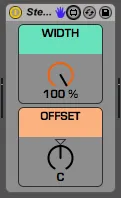
Stereo Imaging Utility
A simple utility to manipulate the natural stereo image of y...
- Type
- Audio Effect
- Author
- istewart
- Version
- 1.0
- License
- Attribution
- Live version
- 9.1
- Max version
- 6.1.3
- Downloads
- 862
- Updated
- No Updates
Stereo Imaging Utility is an Audio Effect for Ableton Live by istewart, distributed as Creative Commons Attribution. It targets Live 9.1 and Max 6.1.3. On maxforlive.com it has 862 downloads. Published 2013-12-11. 2 user comments below.
New to Max for Live? Read what Audio Effects do, what the Attribution license means, how to install a device.
Description
A simple utility to manipulate the natural stereo image of your tracks.
Decreasing the "WIDTH" control slowly pans both the left and right channels toward center, allowing you to maintain the natural image while decreasing it's overall width.
The "OFFSET" control then allows you to shift the entire image left and right, but only by as much as you've decreased it.
For example: if a normal stereo signal consists of the left channel panned 50L (full left) and the right channel panned 50R (full right), reducing the width to 50% will result in the left channel being panned 25L and the right channel being panned 25R. You could then use the offset to move the image entirely to the right side of the stereo field. Increasing the offset to 50R will effectively place the entire image between C and 50R.
Another way to think of it is that at 0% width you have a mono signal (no surprise there), at which point the offset works as a normal pan pot. If you were to offset (pan) all the way left and then slowly increase the width, the right side of your image would slowly move back to the right across your stereo field.
This is my first M4L device, hopefully you find it helpful and effective. Feedback is welcome!
Comments (2)