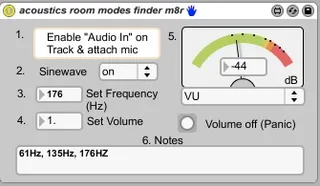
acoustics - room modes finder m8r
acoustics - room modes finder m8r - helps you to find and id...
- Type
- Audio Effect
- Author
- schoolofsound
- Version
- 1.1
- License
- AttributionShareAlike
- Live version
- 9.0.6
- Max version
- 6.1.4
- Downloads
- 4
- Updated
- 2013-12-01
acoustics - room modes finder m8r is an Audio Effect for Ableton Live by schoolofsound, distributed as Creative Commons Attribution-ShareAlike. It targets Live 9.0.6 and Max 6.1.4. On maxforlive.com it has 4 downloads. Published 2013-12-01. 1 user comment below.
New to Max for Live? Read what Audio Effects do, what the AttributionShareAlike license means, how to install a device.
Description
acoustics - room modes finder m8r - helps you to find and identify exact frequencies of standing waves / room modes in your studio room - by ear and VU Meter. It is especially useful for bass / low frequencies.
1. Enable audio in on your track
2. Attach a measurement microphone (normal mics will do for test purposes)
3. Set sinewave to ON
4. Change the volume if necessary
5. Change the model of the VU Meter if necessary
6. Shift through the frequency up from 1 to 20k -> you hear loud peaks where the room modes / standing waves are. Note any peaks you find temporarily in the Notes field.
For my studio, I have identified three standing waves which I will have to correct now: 61Hz, 135Hz, 176Hz.
That's it.
Comments (1)
Good show :)