- Type
- MIDI Effect
- Author
- theape
- Version
- 1.0
- License
- None
- Live version
- 9.0.1
- Max version
- 6.1.2
- Downloads
- 1,456
- Updated
- 2013-12-20
MPKmax is a MIDI Effect for Ableton Live by theape, distributed as freeware, with no license specified by the author. It targets Live 9.0.1 and Max 6.1.2. On maxforlive.com it has 1,456 downloads. First published 2013-12-19, last updated 2013-12-20. 2 user comments below.
New to Max for Live? Read what MIDI Effects do, how device licenses work, how to install a device.
Description
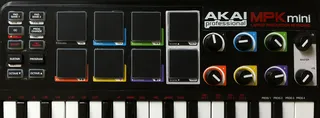
Control Ableton like a groovebox with the Akai MPK mini. This should make you able to throw out a rough but full grown beat in less than two minutes after instrument preselection. Makes me do at least ;)
Put it on a MIDI track, set in & out ports to the mpk.
Get the full package including a nice live set preconfigured with all the tracks and instruments, a filter for the instrument knobs and the CC presets for the mpk mini editor here: http://mtimm.tipido.net/playground/mpkmax.zip
Pad Bank 1: Play Clip Track 1-6
Pad Bank 2: Play Clip Track 7-12
+ 2 scene pads for selecting clip # to play
CC toggle: Rec ready Track 1-6/7-12
Prog Chg toggle: clip length etc.
Sustain + upper left pad: knobs control vol. 1-6 + master
Sustain + upper second left pad: knobs control fx1 1-6 + master
Sustain + upper second right pad: knobs control fx2 1-6 + master
Sustain + upper right pad: knobs control instrument knobs (apply mpkmaxfilter.amxd, select massive & midi learn them)
Sustain + lower left: play/pause
Sustain + lower second left: overdub
Sustain + lower second right: metronome
Sustain + lower right: undo
Have fun and post some videos :)
Comments (2)
Liking the concept for your plugin. I know I may be perhaps not just missing something but I cant get it to work. Can you help please?
Could you do a video perhaps?
I have put MPKMAx on midi channel in ableton. Set in out to mpk. how do I launch the clips? I have put them on audio track 2.
Anyway great concept and one I would use as its how I use my MPK to.
Thankyou,
[email protected]
The link is dead.
http://mtimm.tipido.net/playground/mpkmax.zip
Would You please re up the link?
Thanks