- Type
- MIDI Effect
- Author
- bilaldeledakrew
- Version
- 2.0
- License
- None
- Live version
- 9.0.2
- Max version
- 6.1.1
- Downloads
- 3,286
- Updated
- 2014-11-03
GRID FUNKTION is a MIDI Effect for Ableton Live by bilaldeledakrew, distributed as freeware, with no license specified by the author. It targets Live 9.0.2 and Max 6.1.1. On maxforlive.com it has 3,286 downloads. First published 2014-02-04, last updated 2014-11-03. 15 user comments below.
New to Max for Live? Read what MIDI Effects do, how device licenses work, how to install a device.
Description
V2/ Bug fixed
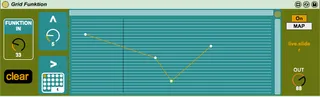
This device allow you to re-arrange the curve of a slider/knob.
Midi map a slider/knob to Funktion In and map a parameter by clicking map and then the parameter.
Draw a new curve, it will be saved with your live set.
You can make your drawing easier by setting a grid for X and Y, zooming X/Y/return to 100% and clearing.
Enjoy and share !
Comments (15)
I used the mapulator before but can't make it work with Ableton live 9 so i was looking for another option and downloaded the Grid Funktion to try. BUT is there any tutorial somewhere ? because i kind of don't get the way you map the parameter???!!
if anybody can help that will be great
thanks
Pholi
I REALLY want to use this but but I think there's a bug in the version you posted. I'm using live 9.1 with Max 6 and the On and Map buttons from the screen shot aren't there when I load it up. Am I missing something or could you post a version that has these buttons activated?
TM
I've updated the device, it was just a stupid bug
It should work now
Tell me
Bilal
It can't control by itself more than one parameter so the answer is yes !
Live 9.7.1 x64
When using this device, UNDO no longer works in Live 9!
See here for more info, seems like a lot of people are having similar problems with M4L devices:
https://forum.ableton.com/viewtopic.php?f=1&t=190512&start=15
When using this device, UNDO no longer works in Live 9!
See here for more info, seems like a lot of people are having similar problems with M4L devices:
https://forum.ableton.com/viewtopic.php?f=1&t=190512&start=15
If you don't want to use this trick, you can open my plug-in in MaxForLive, copy all the architecture (you can see it clicking on Unfreeze device and Patching Mode) except Midi IN and MIDI Out objects and paste this in an empty "Max For Live Audio Effect".
Then you have your GRID FUNKTION Audio Effect ! Because this device don't use any midi or audio input, it will work the same