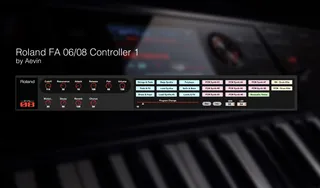
Roland FA 06-08 Control
Roland FA 06-08 Control 1.0 by Aevin --------------------...
- Type
- MIDI Effect
- Author
- aevin
- Version
- 1.0
- License
- None
- Live version
- 9.1.2
- Max version
- 6.1.7
- Downloads
- 831
- Updated
- 2014-08-19
Roland FA 06-08 Control is a MIDI Effect for Ableton Live by aevin, distributed as freeware, with no license specified by the author. It targets Live 9.1.2 and Max 6.1.7. On maxforlive.com it has 831 downloads. First published 2014-08-18, last updated 2014-08-19. 3 user comments below.
New to Max for Live? Read what MIDI Effects do, how device licenses work, how to install a device.
Description
Roland FA 06-08 Control 1.0 by Aevin
---------------------------------------------------------------
This is exclusively for FA owners who would like to use Ableton Live in order to control their synth. You can browse through the tones, automate cutoff, etc.. directly into Live clips, BUT MOST IMPORTANT of all... When you save your project, it saves also the used Tones! In other words, when you load back the project into Live, it forces your FA to directly load the sounds you used!... Just like a VST...
In order to achieve this, the various controls send values to the appropriate controller numbers, as stated into the Roland FA midi implementation manual. To change the patches, the MSB & LSB is send (and stored upon saving the live project, and thus able to retrigger them when the project is loaded again - even when the synth has been previously turned off, changed studio set, etc. )
SETUP
---------------------------------------------------------------
1. Download the 'RolandFA_Control.amxd"
2. Copy "RolandFA_Control.amxd" to your Ableton User Library: Ableton/User Library/Presets/MIDI Effects/Max MIDI Effect (or where it see fits )
3. Now you can find this plug-in in Ableton's Browser ("Max for Live" > "Max MIDI Effect")
4. Drop "RolandFA_Control.amxd" on a MIDI track in Ableton Live
5. Drop an "External Instrument" to the right of it. Set the MIDI and Audio routings according to your setup. ("MIDI To" = Ch. 2)
6. Open Ableton Preferences and check the MIDI Page.
- MIDI Port Input activate: "Track" and "Remote".
- MIDI Port Output activate: "Track", "Remote" and "Sync" ("Sync" can be turned off when you use Ableton's MIDI Clips)
7. Make sure your FA is connected on USB
* Notice: in order to use multiple instances of the device, repeat steps 4 & 5, in new MIDI tracks; each external instrument should naturally be set to a different channel
... Happy jamming!
Please let me know if you find it useful. I think it will be a must have for my future gigs; Hope in yours too ! Also let me know if you find any bugs, or room for improvement.
Comments (3)
I did find when I grouped the device into a rack and assigned the knobs to macro controls, I lose the ability to control the know from the FA-08. Is that expected?
Also just a suggestion it would be so cool if you could display the instrument name on the max for live device after a program change. Not sure if that's possible.
Thanks again for such a great device,
JR
Sorry for not replying. I didn't have the time to develop this further. However, i did uploaded a cut down version of this device.
(and solved a couple of bugs along the way)
http://www.maxforlive.com/library/device/3616
I found this page while looking for an answer to my problem : i can use my FA 06 as a midi keyboard but I cannot load sounds from the synth, it only allows me to use 1 sound, and i can't change it.
can somebody help me ?
thanks