a better search for max devices
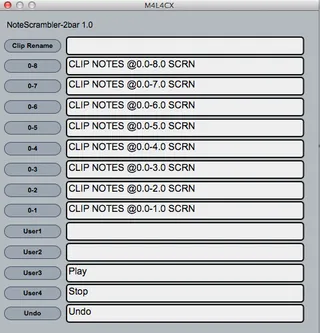
NoteScrambler screenshot

NoteScrambler

by topazUK

First up. full credit must goto Stray at www.nativekontrol.c...

View on maxforlive.com

Type
MIDI Effect
Author
topazUK
Version
1.2
License
None
Live version
9.1.5
Max version
6.1.9
Downloads
322
Updated
2014-10-26

Description

First up. full credit must goto Stray at www.nativekontrol.com for providing the initial m4l4cx and ClyphX, you can download the latest version at http://beatwise.proboards.com/thread/992/current-version-clyphx-live-8

"You must install ClyphX for NoteScrambler to work."

"Please not this only works in session view"

NoteScrambler with reorder midi notes in a clip, you can set a range of notes to be scrambled, ie: the last measure for drum fils, or the middle for variations or the whole loop. because NoteScrambler works on measures I have provided a 1 & 2 bar example. see the ClyphX manual for further examples.

Simply drag NoteScrambler after ie: a drum rack then click the various boxes to instantly reorder midi notes.

Comments (29)

  • MartinH76 · September 05 2014
    This sounds incredibly useful, but I can't get it to do anything. I installed ClyphX and can successfully run [TEST] METRO like they suggest in the ClyphX User Manual to make sure it's running properly.
    I've created a single 2 bar clip on a Drum Rack channel to test it, but pressing the buttons in the NoteScrambler doesn't do anything. Do I need to name the clip or give it an [ID], or something?
  • MartinH76 · September 05 2014
    This sounds incredibly useful, but I can't get it to do anything. I installed ClyphX and can successfully run [TEST] METRO like they suggest in the ClyphX User Manual to make sure it's running properly.
    I've created a single 2 bar clip on a Drum Rack channel to test it, but pressing the buttons in the NoteScrambler doesn't do anything. Do I need to name the clip or give it an [ID], or something?
  • topazUK · September 05 2014
    Hi Martin, 1st this only works in session view.
    You should be able to simply load notescramber after your drum rack, with the UI open select the Clip in session view and click the various boxes. The clip doesn't need a name but this device can name all clips in a session too.
    You need to click the clip you want to scramble.
  • topazUK · September 05 2014
    Also I had to include the max patch but you can simply drag the live preset onto he track too.
  • MartinH76 · September 05 2014
    This sounds incredibly useful, but I can't get it to do anything. I installed ClyphX and can successfully run [TEST] METRO like they suggest in the ClyphX User Manual to make sure it's running properly.
    I've created a single 2 bar clip on a Drum Rack channel to test it, but pressing the buttons in the NoteScrambler doesn't do anything. Do I need to name the clip or give it an [ID], or something?
  • MartinH76 · September 05 2014
    Sorry about all the repeated posts - the webfilter at work seems to be doing something weird when I refresh the page.
    I've done exactly as you've described but I can't get anything to happen. The rename function doesn't work, nor the Play and Stop functions.
  • topazUK · September 05 2014
    Sorry its not working Martin, I am using 9.1.3 suite on Mac OSX 10.8.5
    I have ClyphX enabled as a remote remote (input only)
    Im not sure why its not working :-(
  • topazUK · September 05 2014
    Here is a video showing NoteScrambler working
    https://www.youtube.com/watch?v=mM9WBWfsHWg&feature=youtu.be
  • MartinH76 · September 05 2014
    Ah, that could be it - I don't get ClyphX as a MIDI port option because the manual says to leave the Input and Output section in the Control Surface section blank. I'll create a new IAC port and set it up like that - I'll let you know if it works!
  • topazUK · September 05 2014
    No you shouldnt need that, you only need it as a remote input.
  • MartinH76 · September 05 2014
    I know, but you can't add a remote input if there's no Input set up for ClyphX in the Control Surface section for it. ie. ClyphX doesn't even appear as an available MIDI port if Input is set to "none" in the top half of that pref pane.
  • topazUK · September 05 2014
    Control Surface > ClyphX is all that is needed, no midi IO
  • MartinH76 · September 05 2014
    Oh right, I do have it set up like that. My plan didn't work anyway...
    That video you've posted is making me want this to work even more now!
  • topazUK · September 05 2014
    hopefully we can get some more testers in here to see what could be wrong.
  • MartinH76 · September 05 2014
    I'll check the ClyphX forums to see if I can find anything out. There aren't any non-standard externals in this patch I might need, are there? Did you freeze the device before uploading?
  • topazUK · September 05 2014
    please download this device to make sure clyphx is working ok for you.
    http://www.maxforlive.com/library/device/1940/m4l4cx
  • topazUK · September 05 2014
    its not frozen
  • MartinH76 · September 05 2014
    Yeah, that all seems to work fine. Plus it's really useful!
  • topazUK · September 05 2014
    hmm, that is odd mines not working. im no expert just a bit of a hacker (in the legal sense that is)
  • MartinH76 · September 05 2014
    It might be worth freezing it and uploading it again... I'm not an expert by any means but I know freezing patches is often a simple cure for issues caused by missing externals from other user libraries. Maybe you have something that I'm missing on my system?
  • MartinH76 · September 05 2014
    Do you mean the patch that you asked me to test doesn't work for you?
  • topazUK · September 05 2014
    No, all working fine here.. have re-uploaded frozen.
  • MartinH76 · September 05 2014
    Yes, that's fixed it! Amazing work. This is going to come in REALLY handy for my upcoming live shows :-)
  • topazUK · September 05 2014
    Pheeew.. thank you for your help
    enjoy :-)
  • MartinH76 · September 05 2014
    Oh, I will! Thanks for the great device. :-)
  • shivadonga · October 25 2014
    Hi TopazUK
    Thanks to your amazing tool.
    With the new Maxforlive update does not work,is necessary to do something?
    Best
    M
  • topazUK · October 26 2014
    Hi M
    I have just updated to Max 6.1.9 with Live 9.1.5
    and all is working fine here.
    I have re-saved the device and uploaded just incase there is an issue.
    hope that has fixed any issues.
    Matt
  • shivadonga · October 26 2014
    Hi Matt
    Thanks for the help.Now with the Clyphx v2.4.6 and the NoteScrambler1.0 works perfect
    Best
    M
  • itsBREX · February 17 2020
    Can't seem to get this working with the Live v10.1.7 (2020-01-06_f7eb4c8e0a) on Mac OS X 10.14.6 (18G3020) & ClyphX Pro
    ClyphX Pro installed correctly. Getting these errors in Max: https://i.imgur.com/PL7COka.jpg

← Back to search