Simple Clip Chop
This device basically changes the start position of a clip....
- Type
- Audio Effect
- Author
- midibanks
- Version
- 1.0
- License
- None
- Live version
- 9.0.1
- Max version
- 6.1.1
- Downloads
- 4
- Updated
- 2014-10-18
Simple Clip Chop is an Audio Effect for Ableton Live by midibanks, distributed as freeware, with no license specified by the author. It targets Live 9.0.1 and Max 6.1.1. On maxforlive.com it has 4 downloads. First published 2014-09-30, last updated 2014-10-18. 6 user comments below.
New to Max for Live? Read what Audio Effects do, how device licenses work, how to install a device.
Description
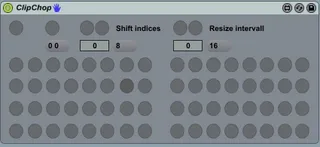
This device basically changes the start position of a clip.
Chop the currently assigned clip in Ableton.
- 64 position buttons.
- Change the position of the chopped range.
- Change the size of the chopped range.
- Set loop on/off of the currently assigned clip.
NOTE: The loop switch of a clip is automatically turned off when the clip is assigned.
0. Set steps for "shift indices" and "resize intervall"
1. Assign a clip with the "Assign selected clip" button.
2. Set the desired startindex and intervall size.
3. Start chopping.
Demo: https://www.youtube.com/watch?v=Y0rYurYN9tw&feature=youtu.be
Comments (6)
do you have a video of how to operate Simple Clip Chop?
...not so simple for me to figure out ;]
Set the steps to any value except 0. If you press a "shift indices" or "resize intervall" button nothing happens, because these buttons only change some internal values of the device.
You can change the clip start position by pressing one of the 64 buttons labeled as "1-64". The clip will then start playing at the specified position.
(I mapped the top 32 buttons of the launchpad to the first 32 buttons of the device as you can see in the video).
If you have more questions, feel free to ask ;)
And the buttons start at 0 and end at 63.
Example:
"Shift indices" is set to 0 (you can check the actual value under "Shift indices"), so the intervall starts at beat 0.
"Resize intervall" is set to 1 (actual value can be checked under "Resize intervall"), so buttons " 0-63" set the start position of a clip to beat 0-63 and play the clip.
"Shift indices" is set to 1, "Resize intervall" is set to 1:
Buttons "0-63" now set the start position to 1-64.
"Shift indices" is set to 0, "Resize intervall" is set to 2:
Buttons "0-63" now set the start position to 0,2,4,6,8,10,....,126.