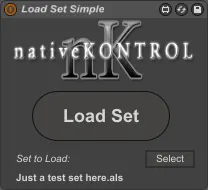
Load Set Simple
Load Set Simple is a utility for loading a set from M4L. It...
- Type
- Audio Effect
- Author
- Stray
- Version
- 1.0.2
- License
- AttributionNonCommercialNoDerivatives
- Live version
- 9.1.6
- Max version
- 6.1.9
- Downloads
- 1,049
- Updated
- 2015-08-27
Load Set Simple is an Audio Effect for Ableton Live by Stray, distributed as Creative Commons Attribution-NonCommercial-NoDerivatives. It targets Live 9.1.6 and Max 6.1.9. On maxforlive.com it has 1,049 downloads. First published 2015-02-25, last updated 2015-08-27. 17 user comments below.
New to Max for Live? Read what Audio Effects do, what the AttributionNonCommercialNoDerivatives license means, how to install a device.
Description
Load Set Simple is a utility for loading a set from M4L. It provides a simple mechanism whereby you can define a set that should 'follow' the current set and allows you to load the defined set via a key/MIDI mappable button. It also manages the dialog that pops up upon loading a set if the current set contains changes.
This can be used to create a list of sets that you can easily switch between via a single key/MIDI trigger (simply include the device in each set that is part of the list and define the set that should follow it). It can also be used to re-load the current set and return it to its default state after having mangled it (simply include the device in the set and select the set itself as the set that should follow it).
NOTE: This utility will likely not work correctly if Allow Multiple Instances is turned on in Live's Preferences.
VERSION HISTORY:
v1.0.1 (March 1, 2015)
* Fixed issue on OS X where loading sets from drives other than the system drive didn't work.
* Added version # to file name.
v1.0.2 (August 27, 2015)
* Fixed issue on OS X where re-loading certain sets didn't work correctly.
Comments (17)
live 9.1.6
max 6.1.9
i tried it with different sets.
it works with very simple sets. but there are two different behaviors, when it comes to more complex sets:
a) if the set to load contains ml4 devices
-> live crashes: "Live wurde unerwartet beendet" wich means "Live was terminated unexpected"
b) the live set contains no m4l devices
-> the m4l dialog "set loading" opens end say "set loading" but nothing happens. i can close the dialog and work along, like nothing happened.
hope that helps, because i like that little device. would be very helpful.
thanks for your work
dorsch
Max could not launch URL. err = -43
http://beatwise.proboards.com/thread/1368/locating-lives-log-txt-file
You can send that to stray (at) nativekontrol.com
Also, please mention what occurs if, while Live is running, you use Finder to launch one of these problematic sets.
@fjw, what is the exact path of the set that is related to the error? And, no, please don't distribute derivative devices.
[opendialog] gives this format: harddrive:path/to/file.als
[max.launchbrowser] needs /Volumes/harddrive/path/to/file.als
If you like I could send you my playlist version of your patch which is working on Mac at the moment
If you've got some other idea about it though, sure, send me an email at stray (at) nativekontrol.com.
I wish to load in sequence a series of Live Sets simply by pushing a key on a midi keyboard.
Will Load Set Simple allow me to do this?
Can someone please explain in simple terms, step by step how to use this utility?
TIA
Regards,
Thomas
Unbelievable that is so hard to find...spent hours looking for a solution and finding all possible ways to do it myself...and a solution as simple as that was there!
I load for all songs of my set a track of clips and in this track there are several loaders, and each clip when started trigger one specific loader for one specific set!
Easy...then colouring in red the actual loaded one makes it super easy to know where I am in the setlist and what to load afterwards (or to reload if any problem!)
This is a really good MAX device but it does not work if the Sets are stored in a Pendrive. Do you know a way to make it work?
I really need the option of use the songs stored in my pen drive.
Regards