- Type
- Audio Effect
- Author
- patrickkidd
- Version
- 1.0
- License
- Attribution
- Live version
- 9.1.6
- Max version
- 6.1.9
- Downloads
- 646
- Updated
- 2015-05-06
PK Sampler is an Audio Effect for Ableton Live by patrickkidd, distributed as Creative Commons Attribution. It targets Live 9.1.6 and Max 6.1.9. On maxforlive.com it has 646 downloads. Published 2015-05-06. 1 user comment below.
New to Max for Live? Read what Audio Effects do, what the Attribution license means, how to install a device.
Description
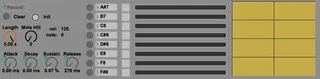
Allows you to record notes or sounds live on stage with midi foot pedals and then sequence them with midi right there on the spot. Makes for very fun organic-sounding trance-like sequences that live audiences love.
REQUIRES "PK MOLE HILL" DEVICE TO RECEIVE MIDI!
FEATURES
- Records in realtime from any audio channel.
- Automatically trims leading and trailing silence from samples
- ADSR for sample playback (very useful!)
- Playback level meters + sample waveform display
- Can assign each of 8 channels to any note value.
INSTRUCTIONS
- Drop PK Sampler device into audio track (mole hill is always in receive mode).
- Drop PK Mole Hill device (set to send mode) into a midi track receiving from midi foot pedal (f.ex FCB1010)
- (Optionally) Drop second PK Mole Hill device into second midi track containing step sequencer or midi clips to play recorded samples.
- Assign PK Sampler note values to match those of the foot pedal.
- Assign one pedal to the "Record" button to arm the device.
- Assign one pedal to the "Clear" button to clear all samples and start over.
- Press and hold the assigned midi foot pedal for a sample and then play the sound. Release the pedal to stop recording. Max is 5000ms, silence is automatically trimmed.
- Repeat for remaining foot pedals.
- Don't forget to disarm the device using the pedal assigned to the "Record" button.
- Play notes into PK Sampler via any PK Mole Hill using the same channel, and adjust ADSR to suit. I use Ableton Push's step sequencer and have a total blast with this.
Enjoy!
Comments (1)