- Type
- Audio Effect
- Author
- floszk
- Version
- 1.0
- License
- Commercial
- Live version
- 9.1.10
- Max version
- 6.1.10
- Downloads
- 4
- Updated
- 2020-02-19
Shaker is an Audio Effect for Ableton Live by floszk, distributed as a commercial (paid) device. It targets Live 9.1.10 and Max 6.1.10. On maxforlive.com it has 4 downloads. First published 2015-07-22, last updated 2020-02-19.
New to Max for Live? Read what Audio Effects do, what the Commercial license means, how to install a device.
Description
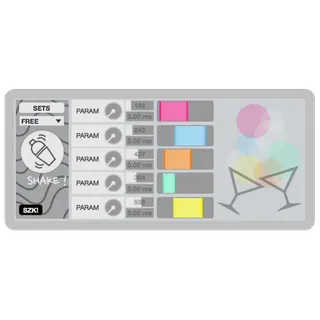
Shaker allows you to grip'n shake Live's parameters. Link parameters to knobs and automatic change their values randomly to create automated variations, from fine modulations to total chaotic strange sounds. Shaking ! One Shaker can grip up to 5 parameters. On a same Shaker you can grip any parameters located on different places of your Live set. Use many Shaker for complex configurations !
#Grip parameters (+ Midi mapping)
Click the "Set" button on the top-left area. Lock/Unlock will appear over the knob. Proceed one by one (IMPORTANT) :
1# Unlock (button turns green).
2# Click on parameter somewhere on your live set
(parameters can be those on other tracks).
3# Once gripped, the parameter's name appears.
4# Re-lock (button turns red).
Reset param : same than gripping, but click on button itself.
Midi mapping : map the red knob.
#Shake Button
Hit the button to launch the shaker. You can choose between Free or Quantized. If Quantized, the shaker will launch only if the Live's global transport is playing.
#Random Steps
Random steps start with the shake button. For each knob you can set a bpm at which random values will be picked. You can introduce more randomness with an additional delay range. If so, random values will be chosen at each bpm's step + a random delay picked between 0 ms and the entered value.
#Slider / Random Range
Click to define the min and max of the random range. At each bpm's step a random value will be picked into this interval.
#Leds / Bubbles
Leds are blinking at bpm's step and indicate that a new random value is chosen. Colors refer to their respective knobs. Gray ones indicate the picking when an additional delay is introduced.
______________________________________________________
A video about this device :
https://www.youtube.com/watch?v=w07gGwtxFmc
______________________________________________________
For more information please visit : http://flo.szk.fr/m4l/