a better search for max devices
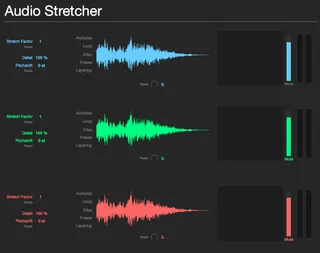
Audio Stretcher screenshot

Audio Stretcher

by kgunessee

http://kgunesseeaudio.com/audio-stretcher

View on maxforlive.com

Type
Instrument
Author
kgunessee
Version
1.0
License
None
Live version
9.5
Max version
7.0.6
Downloads
2,689
Updated
2015-11-04

Description

http://kgunesseeaudio.com/audio-stretcher

Comments (21)

  • fhunktion · November 04 2015
    Cant get any sound out of this either with midi or the autoplay option. there is no playhead
    It looks intriguing though.
  • Anivia · November 05 2015
    Same here no playhead, same versions used, Live 9.5 and M4L 7.0.6. Also only get the whole window to view when I go fullscreen on a Retina, that's kinda too big if you only have a Laptop, why not have a view in Device Section of Live? Could easily have a window where you can simply switch through the different waveforms, preserving space or not?
  • kEllZ · November 05 2015
    yeah , I'm not getting any sound either , Live9.5 n M4L 7.0.6.
    Neither midi or auto play ....? looks fun though .
  • blortblort · November 06 2015
    having the Paulstretch functionality in this interface would be the best...hope the playhead issue can be resolved...I can get nothing from the device as is...even added vb.stretch~ to Max library in hopes that would do it...nada...
  • amalgam · November 07 2015
    Playhead issue. This match is not functional.
  • BartSchuller · November 07 2015
    I got it to work thanks to the instructions in this video: https://www.youtube.com/watch?v=ExnDJKWR89g
    - Download vb.stretch~ from http://vboehm.net/downloads/
    - Unzip it and place the contents next to the Audio Stretcher.amxd
    - Open the Audio Stertecher.amxd in Live and confirm it now works.
    - Edit the device in Max
    - Freeze it
    - Save it
    - In Live, save the device as a Preset. This installs the amxd, so you can remove the downloaded copy.
  • BartSchuller · November 07 2015
    Another thing I found out: dragging in AIFF files doesn't work, but WAV files do work.
  • blortblort · November 08 2015
    "- Unzip it and place the contents next to the Audio Stretcher.amxd"
    ...ya lost me with "place the contents NEXT to Audio Stretcher.amxd"...
    do you mean place the contents of the vb.stretch~.zip in the same FOLDER as Audio Stretcher.amxd?
    If that is the case, this does not make the playhead appear when I load Audio Stretcher.amxd in Live...
  • blortblort · November 08 2015
    BTW...per the instructional video, for me...there IS no *.mxe version of vb.stretch~ in the zip file I pulled down from http://vboehm.net/downloads/...so if you are working from the info in the video, how are you able to make this work?...unless you are on a mac system?
  • quest · November 08 2015
    Thanks so much for this device! Looks amazing! I've been wanting something like this for a really long time and I can't wait until we work out all the kinks. Thanks to everyone for the help so far.
  • quest · November 08 2015
    Thanks BartSchuller. Method worked perfect for me on mac!
  • kEllZ · November 08 2015
    someone , ie; BartSchuller ,should possibly repost the working version and make everyone super happy ... I know I would be .
  • kEllZ · November 09 2015
    BartSchuller to the rescue , your way worked like a charm ,.....
  • blortblort · November 09 2015
    quest confirmed the BartSchuller method works on mac
    kEllZ confirms success via BartSchuller method as well...
    KEllZ- are you on mac or pc?
  • kEllZ · November 09 2015
    I'm on OSX intel chip mac.
  • amalgam · November 10 2015
    BartSchuller method unfortunately not working for me.
    I placed the vb.stretch~ folder in the same directory as Audio Stretcher.amxd but am still getting the following error in the max console:
    newobj • vb.stretch~: No such object
    Btw I am running in 64bit mode.
  • blortblort · November 11 2015
    Hi amalgam,
    I believe that the Bart method only works (...at present) for mac
    kgunessee has not chimed back in to confirm if there is to be any further update...certainly hope there is! this would really be nice if it worked on win ;]
  • amalgam · November 12 2015
    Hi blortblort ,
    I'm on on a mac running the 64bit build of Live 9.5.
  • quest · November 12 2015
    As mentioned above, worked fine thanks To Bart's instructions. If it helps, I'm running Mac 32 bit ableton here.
    Aiff, wave and mp3 files are all working for me.
    C
  • quest · November 12 2015
    One other thing I just noticed. Although the instrument settings (stretch, filter, etc) are saved, the audio clips that I've dragged in are not saved with the project, even after 'collect all and save'. The set always seems to revert to the initial sounds.
  • diarmaidcollins · February 21 2020
    Hey folks. Been seeking a decent Time Stretch device for a while and this looks like it ticks all the boxes. However, as the last post points out, any WAV file dopped in seems to revert back to the initial sounds.
    Anyone ever find a solution to this?

← Back to search