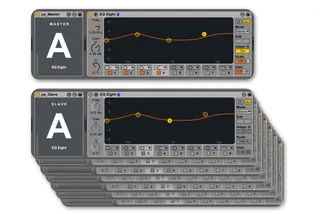
yaGroup - multichannel audio effects
make any Live device multichannel capable this device pai...
- Type
- Audio Effect
- Author
- yarhammer
- Version
- 3.5
- License
- AttributionNonCommercial
- Live version
- 10.1
- Max version
- 8.0.6
- Downloads
- 3
- Updated
- 2019-06-20
yaGroup - multichannel audio effects is an Audio Effect for Ableton Live by yarhammer, distributed as Creative Commons Attribution-NonCommercial. It targets Live 10.1 and Max 8.0.6. On maxforlive.com it has 3 downloads. First published 2016-09-21, last updated 2019-06-20. 14 user comments below.
New to Max for Live? Read what Audio Effects do, what the AttributionNonCommercial license means, how to install a device.
Description
make any Live device multichannel capable
this device pair allows you to link Live's standard (audio) devices across tracks & sends.
v.3.5 with fixes and optimisation especially for Live 10.1
• 10 groups (A-J) are supported per live set.
• place ya_Master just before any of Live's audio effect device you want to make a master
• place ya_Slave just before the same kind of device in any other track, send or rack to make it a slave.
• any changes to the master device are also affecting all slaves of the same group
• any automation of the master device also affects the slaves
• pre configured master & slave racks for all Live standard audio effects are included.
• tip: experiemts of multiple slaved effects withing one track are fun too.
please note: These devices have been created for our own use and only been tested on Mac.
If you run into problems you may send reports and comments to [email protected]
However, we do not officially offer support and might not be able to help or answer at all.
v2.3 fixed saving of the master's group setting.
a specialized version for EQ Eight that allows inverting the Scale parameter is also available here:
http://www.maxforlive.com/library/device/3827/yaeq8-multichannel-eq-eight
Comments (14)
That is exactly what I anted to do with this device!
I can do it by macroing an EQ inside a Audio Rack but it is cumbersome to say the least ...
inserting a "stupid" inversion of the values would cause a mess and actually switch off all slave devices by inverting the switch of the master.
however, ya_Group can also be linked to an audio effects rack and its macro controls. so if you where to select the bands of interest and link them to macros that are linked to ya_Group… this could be a way.
I was messing about inside the device and noticed this exactly, simply inverting data does not work.
I was wondering would you be up for creating a device completely dedicated to EQ8 (or even better the fabfilter pro q2 ;) that would do the 'inverting' correctly.
Such device would be a godsend!!
Only the data from the gain knobs would be inverted. Other functions would be left as is. Keeping the 'scale' function un-ganged would be killer feature too.
Pretty please with a sugar on the top xoxoxox
Simply removing the slaving of the eq8 'SCALE' parameter to the master device would accomplish everything!
Please?
using Scale here is the right way to go.
It will be looked into when freewheeling.
Here is a version modded exclusively for use with EQ8:
https://www.dropbox.com/s/bdreprk3ixl9iwg/yaGroup_Px_Mod_EQ8.zip?dl=0
http://www.maxforlive.com/library/device/3827/yaeq8-multichannel-eq-eight
including an inversion switch.
@Parametex I'd prefer You link to that instead as well. thanks.