- Type
- MIDI Effect
- Author
- Tsachi777
- Version
- 1.1
- License
- AttributionNonCommercialShareAlike
- Live version
- 8.1.5
- Downloads
- 733
- Updated
- 2010-10-25
Midiblocker is a MIDI Effect for Ableton Live by Tsachi777, distributed as Creative Commons Attribution-NonCommercial-ShareAlike. It targets Live 8.1.5. On maxforlive.com it has 733 downloads. First published 2010-09-06, last updated 2010-10-25. 3 user comments below.
New to Max for Live? Read what MIDI Effects do, what the AttributionNonCommercialShareAlike license means, how to install a device.
Description
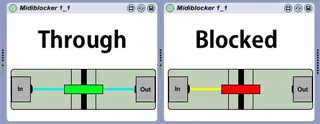
Instead of using an unnecessary ammount of Live clips in Drum Rack, simply drop the device infront of each instrument, map to a controller or key, and activate. This device lets the sound of the instrument play out fully instead of cutting out instantly like muting does, and gives Drum Rack the feel of a true internally-sequenced drum machine instead of a Live clip-sequenced one.
EDIT:
1: It looks nicer now!
2: Generates note-off when activated to stop hanging notes. Those are really annoying.
Comments (3)
When I say unnecessary clips in Drum Machine, I mean using a whole new clip to introduce more sounds to the same pattern in the other clip. With this device, you get the same effect as playing a different clip but with less clips and a 'live' feel to bringing in drum sounds. If this device still isn't clear, then I'm sorry, I'm terrible at explaining things.
I've noticed that a similar device here has already been made that can block specific parts of the midi signal (note, cc, aftertouch, etc.), and not just the whole thing. In the next version, I might steal this idea, and also introduce blocking certain notes instead of all of them.