Launchpad Text Display And Light Show
The Launchpad Text Display and Light Show is a MIDI device t...
- Type
- MIDI Effect
- Author
- CreatureCub
- Version
- 1.0
- License
- None
- Live version
- 9.6.2
- Max version
- 7.2.4
- Downloads
- 1,902
- Updated
- 2017-02-07
Launchpad Text Display And Light Show is a MIDI Effect for Ableton Live by CreatureCub, distributed as freeware, with no license specified by the author. It targets Live 9.6.2 and Max 7.2.4. On maxforlive.com it has 1,902 downloads. First published 2016-11-18, last updated 2017-02-07. 9 user comments below.
New to Max for Live? Read what MIDI Effects do, how device licenses work, how to install a device.
Description
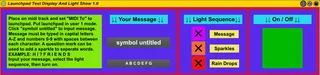
The Launchpad Text Display and Light Show is a MIDI device that can display a light show on the Novation Launchpad. Text is input by the user and converted to MIDI messages which then can be displayed along with two other light displays using a selectable light show sequence.
demonstration GIF
http://giphy.com/gifs/launchpad-text-display-and-light-show-3o7TKtPT9HtmpLpV8A
The selectable light show displays in the light show sequence are:
1. Flashing text display
2. Random sparkling lights
3. Random falling rain drop lights with sequenced colors
Steps to use this device
1. In Ableton, place the device on a blank MIDI track
2. Select “MIDI To” to the Launchpad and make sure the MIDI channel is that of the Launchpad
3. Put the Launchpad in “User 1” mode
4. Click on “symbol untitled” and type your text
-Only capital letters A-Z and numbers 0-9 are acceptable
-Up to 36 characters can be input
-A space must be put in between each character
-A question mark “?” can be used to break up words
-EXAMPLE: I ? L I K E ? M U S I C
5. Under “Light Sequence” check the boxes you wish to display
6. Select the “On / Off” Box
This device was made using the Launchpad Classic. I assume it would work with the Launchpad S and Launchpad Mini, but since the Launchpad Pro has more colors, it might not work with that. If you have any questions or problems please contact me or leave a comment.
Comments (9)
Would it be possible to add a 'Flip Text' option to display the message(s) upside down? i.e. so the audience can read the message.
Would it be possible to add a 'Flip Text' option to display the message(s) upside down? i.e. so the audience can read the message.
Since the first column of buttons on the Launchpad is midi notes 33, 37, 41, 45, 49, 53, 57, 61, 65, you would need to flip the numbers. So a note on 33 would become 65, 61 would become 37, etc.
I could make this switch but it would take some time. In the meantime just flip your launchpad around! haha
works fine with me but keep on looping, any suggestion am new here
Thanks Creatureclub for made this patch