automated mouseclick
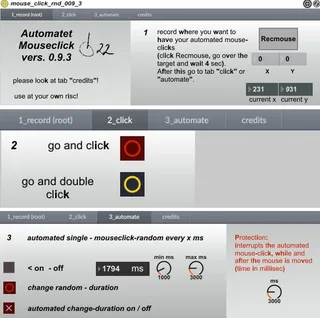
automated mouseclick does mouseclick(s) (randomly) on any pa...
- Type
- MIDI Effect
- Author
- b22
- Version
- 0.9.3
- License
- None
- Live version
- 9.7.1
- Max version
- 7.3.1
- Downloads
- 288
- Updated
- 2017-02-12
automated mouseclick is a MIDI Effect for Ableton Live by b22, distributed as freeware, with no license specified by the author. It targets Live 9.7.1 and Max 7.3.1. On maxforlive.com it has 288 downloads. First published 2017-01-16, last updated 2017-02-12. 2 user comments below.
New to Max for Live? Read what MIDI Effects do, how device licenses work, how to install a device.
Description
automated mouseclick does mouseclick(s) (randomly) on any part of your screen (without java!).
So you can manupulate i.e. buttons (from vst`s) that can`t be automated by midi or by keyboard ...
Most parts are taken out from:
Mouse Move And Clic Automation V3 Mikado 3.0 by spiralune:
http://www.maxforlive.com/library/device/3250/mouse-move-and-clic-automation-v3-mikado,
11clicks -- simulate mouse input by 11OLSEN:
http://www.11olsen.de/code/max-objects/11clicks
and
AutomatedClickPro 1.0 from 11olsen:
http://www.maxforlive.com/library/device/3964/automatedclickpro
Thanks to these!!!
made with Win7 - Live 9.7.1 - Max4Live 7.3.1
Use at your own risc!
Vers 0.5.1: only some optical changes
Vers 0.6: external embedded! Excuse - I didn`t know!
Vers 0.7: ability to switch on and off automated duration-time of mouseclick-changes
Vers 0.8 New look with 4 tabs
Vers 0.8.1 Known bug with the double-click-button repaired - thanks to 11olsen!.
Vers 0.9.1 Added: Protection - interrupts the automated mouse-click, while and after the mouse is moved. It`s similar to the interrupt-function in the "AutomatedClickPro"-device from 11olsen!
Vers 0.9.2 added: possibility to change the range for randomed mouse-clicks
vers.0.9.3_ minor bugfixes
Comments (2)
That way, items on a contextual menu could be automated. For example, when warping tracks, in clip view:
1) Selecting the transient with right click
2) Place 1.1.1 Here
3) Warp From here
Could all be done from a single action. The menu itself is a measurable-sized window, provided the Zoom Display value doesn't change. It's just that the absolute location of the pop-up, the selected transient, nor can the clip wave view itself be predetermined. But once the contextual menu is up, it's the same movement each time to select the items. Those Mouse clicks would be helpful to have in one action.