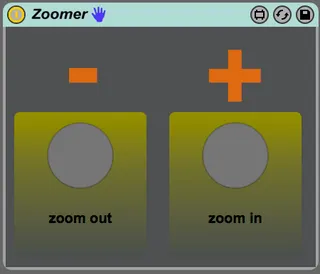
jot.zoomer Zoom Utility
Finally I managed to find a way to control the ableton zoom ...
- Type
- Audio Effect
- Author
- Render
- Version
- 1.2
- License
- Attribution
- Live version
- 9.6.2
- Max version
- 7.2.4
- Downloads
- 988
- Updated
- 2018-09-12
jot.zoomer Zoom Utility is an Audio Effect for Ableton Live by Render, distributed as Creative Commons Attribution. It targets Live 9.6.2 and Max 7.2.4. On maxforlive.com it has 988 downloads. First published 2017-01-24, last updated 2018-09-12. 13 user comments below.
New to Max for Live? Read what Audio Effects do, what the Attribution license means, how to install a device.
Description
Finally I managed to find a way to control the ableton zoom keys.
Just key- or midimap the buttons and zoom with them.
Tip: just save it into your default session to have the zoom keys by default.
IMPORTANT: you need the java development toolkit in order for this to work!
http://www.oracle.com/technetwork/java/javase/downloads/jdk8-downloads-2133151.html
Comments (13)
Any chance of adding an option like holding SHIFT to control vertical zoom of tracks in arrangement view in addition to horizontal?
but im sorry, I have to disappoint you, because max devices only receive keypresses, when they are active (clicked on, changing values, etc.) so the device wouldn't receive the shift keypress. maybe this is possible with an external, but I dont have something like that.
Best, J
http://www.maxforlive.com/library/device/2450/push-arrangemode
...but I can't make this little guy work!
It loads and opens in Live, and I can map it with both "K" and "M" and it lights up, but...
...it doesn't zoom in.
Or zoom out.
What am I doing wrong?
Hellllllllp!
My system is Maverick 10.9.5 and i instaled javaforosx.dmg (old one recomanded)
Unfortunately jot.zoomer Zoom Utility 1.2 don't works :/
Can u help me please?
Best regards.
Samy.
I installed java too....