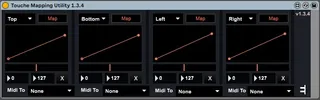
Touche Mapping Utility
This device was designed to help you map the four axes of To...
- Type
- MIDI Effect
- Author
- ExpressiveE
- Version
- 1.3.4
- License
- AttributionNonCommercialNoDerivatives
- Live version
- 9.6.2
- Max version
- 7.2.4
- Downloads
- 3
- Updated
- 2022-05-11
Touche Mapping Utility is a MIDI Effect for Ableton Live by ExpressiveE, distributed as Creative Commons Attribution-NonCommercial-NoDerivatives. It targets Live 9.6.2 and Max 7.2.4. On maxforlive.com it has 3 downloads. First published 2017-10-30, last updated 2022-05-11. 11 user comments below.
New to Max for Live? Read what MIDI Effects do, what the AttributionNonCommercialNoDerivatives license means, how to install a device.
Description
This device was designed to help you map the four axes of Touché to the instruments, effects, and parameters of Ableton Live, Max for Live patches, and FX plug-ins.
More information is available here: https://expressivee.happyfox.com/kb/article/119-setting-up-touchli-in-ableton-live/
Designed by Expressive E © 2020.
You will need to register a Touché or Touché SE inside your customer account in order to acccess the download.
https://www.expressivee.com/myproducts
Comments (11)
Great device, thx. I think this will really help incorporate Touche into my live set. A question though. There seems to be a disconnect between the Max and Min numbers on the bottom (to the left of the Reset X), and the movable start and end points of the charted envelope. How is that meant to work. What are the bottom numbers meant to control?
Also, is it possible to Map to pitch bend using this device? and How.
Thanks in advance
Again, in Lie you can scroll through a list of assignments for each shifty, most are CC assignments, so I assume,( YMMV, IDK) that one of those is the CC for pitchbend.
Hope this helps., I 'm still playing with it, haven’t really used it yet.
I've created a utility that lets you map pitch bend to the touche if you would like to try it. https://maxforlive.com/library/device.php?id=6026
Thanks for the great work!