- Type
- Audio Effect
- Author
- zangpa
- Version
- 1.0
- License
- None
- Live version
- 8.2.1
- Downloads
- 1,386
- Updated
- 2010-11-18
Trigger Scene is an Audio Effect for Ableton Live by zangpa, distributed as freeware, with no license specified by the author. It targets Live 8.2.1. On maxforlive.com it has 1,386 downloads. Published 2010-11-18. 7 user comments below.
New to Max for Live? Read what Audio Effects do, how device licenses work, how to install a device.
Description
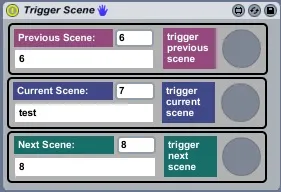
I've made a small patch that lets you launch next, current and previous scene (and midi map the functions). I know this is possible in live to, but a well hidden secret :)
In addition it will show you track scene numbers and names of previous, current and next scene.
The patch is an audio device, so drop in any track!
Hope someone find it useful.
NB! Just added the possibility to open TriggerScene as a float (doesn't show on the picture)
Comments (7)
iam made this patch with part of your patch
http://www.maxforlive.com/library/device/4084/mikado-scenes-kontrol-and-monitor
good vibbbbb
But I can't open the floating window.
Any chance this can be fixed ?
thanks a lot for your device!
It seems that the number of scenes it can control is limited to 334. If so, is there any way to change this to a larger number?
greenx
LV