a better search for max devices
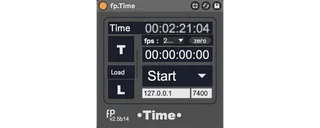
fp.Time screenshot

fp.Time

by eltnet

Time & Locators managment. v2.5b14 https://youtu.be/X...

View on maxforlive.com Website

Type
MIDI Effect
Author
eltnet
Version
2.5
License
Commercial
Live version
12.1.11
Max version
9.0.5
Downloads
1
Updated
2025-05-21

Description

Time & Locators managment. v2.5b14

https://youtu.be/Xz-oXTUQ_HQ

- Display: 3 sizes floating window.

- Time: Display hh:mm:ss:00 / frame (with FPS choices) / bar:beat:unit / sample

- Set offset (zero reset).

- Jump by typing timecode.

- Locators: set, delete, clear, navigation (previous, current, next).

- Locators list can be saved & loaded from file.

- Notes: comment for each locator.

- Network: Send current timecode and midi notes of the track in format "midinote n" (no velocity).

Previous name was fp.Clock.

Comments (10)

  • mrfracas · February 28 2018
    Hi, I've downloaded your device. Great concept. Ableton sure does need it. I'm using Live Suite 10. The jump to timecode function does not work, and I can't set an offset. Please advise. Thanks, Matt
  • eltnet · February 28 2018
    For the jump, did you enter the message strictly in the format 00:01:23:45 ? That's only thing to do.
    For offset:
    1- go where you want to put offset (ie 2.3)
    2- click on reset
    3- press stop to go back to marker 1, you can see offset of -3:52
    hope it helps.
  • eltnet · February 28 2018
    Also, for the jump, it can jump only if the time exists in your song. ie: the song is 5', you can't go to 10'. Just you need to create event first at 10. That's limitation of Ableton Live time managment…
  • thomasghenry · September 19 2018
    love it! thx! needed this for a while...
  • kajddavid · November 20 2019
    Hi - great device, thanks!
    However the clock shows an incorrect time after any tempo changes in the timeline. Any ideas how to fix this?
  • liambyrne · December 06 2019
    Is there a way to increase the size of the Notes Window? Or the size of this text? I basically just want to have a fullscreen window that displays the name of my locators.
    Thanks in advance!
  • alexabahmed · February 17 2020
    This is Great!
    I would also like to know if there are any fixes regarding tempo changes?
  • YoshDes · July 07 2020
    Hey this is a great device. I love the note system. Very good for post production work when you have notes per scene. Althougth I am having a bit a slip with timecode as well. I have set the proper fps and other setting to the best of my knowledge. Anyone know what I can do? I would love to use this in a professional atmosphere but the time code has to be spot on.
  • eltnet · November 04 2021
    Yeah Ableton sucks because the native timecode is only related to BPM, not absolute time. So if tempo changes, fp.Clock can't know what was the previous BPM and calculate from the actual one.
  • GuidoDeluxe · July 15 2022
    Hi Fabrice! Could you explain how the "Cues via network" function works, please?

← Back to search