Knob Twiddler2
Hi Folks, This is a completely overhauled version of my prev...
- Type
- MIDI Effect
- Author
- opticon93
- License
- AttributionNonCommercialShareAlike
- Live version
- 11.2.7
- Max version
- 8.5.2
- Downloads
- 869
- Updated
- 2023-01-30
Knob Twiddler2 is a MIDI Effect for Ableton Live by opticon93, distributed as Creative Commons Attribution-NonCommercial-ShareAlike. It targets Live 11.2.7 and Max 8.5.2. On maxforlive.com it has 869 downloads. First published 2018-03-08, last updated 2023-01-30. 5 user comments below.
New to Max for Live? Read what MIDI Effects do, what the AttributionNonCommercialShareAlike license means, how to install a device.
Description
Hi Folks, This is a completely overhauled version of my previous Knob Twiddler. In particular, it fixes the issues mentioned by "C" in the comments below. Now it can remember all of its settings when reloading the Live set.
Essentially, this is an artificial knob twiddler that simulates what a human "could" do with a knob, using their Thumb and Index finger. This is totally different from what an LFO or an envelope can do. Most humans can't twiddle a knob quickly and precisely like an LFO.
Usage:
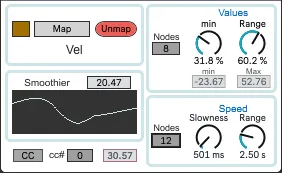
Map to your Live parameter.
The Value row sets the min/Max values of the mapping. Values will be between min and min + Range (= Max). The Nodes determine the number of breakpoints in a period between minimum and Maximum. I like medium complexity with the Nodes somewhere between 7 and 14.
On the Speed row, decreasing the Slowness is equivalent to increasing the Fastness. I generally prefer to have the Slowness above 500ms. If its smaller than that, it starts to get inhuman. The Nodes parameter sets the number of slope changes that can happen in a given period. I like medium complexity with the nodes somewhere between 7 and 14.
Smoothier rounds out the corners.
It can also send the mapping out to a specific CC#. This is useful for External Instruments that don't have a GUI.
Enjoy
Comments (5)
I've run across a problem with persisting settings: the "Min" and "Range" dials in the Values section both reset themselves to `0.24` when the Live project containing the device is loaded (and when closing the M4L editor window after viewing the device). I'm sure it has something to do with the `* 0.24` object feeding into both dials, but that's as far as I got.
Its been a long time since I've dived into this one. I'm pretty sure the "0.24"'s are because I had difficulty getting the Current Value of the mapped parameter, so I set the knobs to 24% of their max value to be safe. Otherwise, they would randomly go to the max or min value when mapped.
I've had many problems when changing the attributes (max, min and current value) of a knob. For example, when any attribute is changed, the knob can no longer be automated correctly in Ableton. Ableton only remembers the original value of the knob. Nevertheless, I like this version better than the previous one.