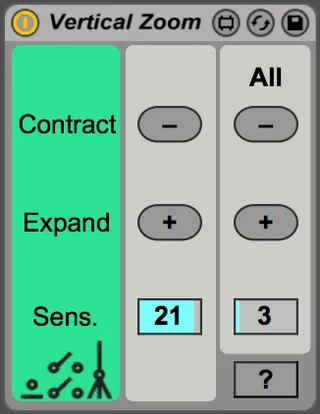
Vertical Zoom
Vertical Zoom lets you use keyboard shortcuts instead of the...
- Type
- MIDI Effect
- Author
- michaelterren
- Version
- 1.0
- License
- None
- Live version
- 9.7.6
- Max version
- 7.3.5
- Downloads
- 459
- Updated
- No Updates
Vertical Zoom is a MIDI Effect for Ableton Live by michaelterren, distributed as freeware, with no license specified by the author. It targets Live 9.7.6 and Max 7.3.5. On maxforlive.com it has 459 downloads. Published 2018-06-09. 4 user comments below.
New to Max for Live? Read what MIDI Effects do, how device licenses work, how to install a device.
Description
Vertical Zoom lets you use keyboard shortcuts instead of the mouse to vertically zoom a track in the Arrange view. Put it on your master channel, set keyboard shortcuts using the "Edit Key Map" functionality, and save it as your default Live preset.
This is of limited value for Live 10 where vertically zooming a track is easier, but on popular demand I've uploaded it here. I have no plans to update it.
This device was originally posted as part of a series of blog posts about programming in Max for Live at Noisemaker Academy, which has since deprecated. http://www.noisemaker.academy/vertical-zooming-in-live-using-keyboard-shortcuts/
Comments (4)
Now I can zoom all tracks together vertically. Thank you.
I just want to ask one question. Is there a way to make the buttons work when not only pressing but also holding?