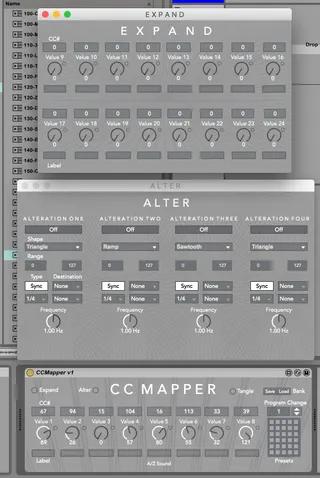
CCMapper - MIDI CC Mapper and Modulator
CC Mapper facilitates realtime MIDI CC modulation and automa...
- Type
- MIDI Effect
- Author
- flec8
- Version
- 1.3.3
- License
- None
- Live version
- 10.0.1
- Max version
- 8
- Downloads
- 7,857
- Updated
- 2022-01-13
CCMapper - MIDI CC Mapper and Modulator is a MIDI Effect for Ableton Live by flec8, distributed as freeware, with no license specified by the author. It targets Live 10.0.1 and Max 8. On maxforlive.com it has 7,857 downloads. First published 2018-11-12, last updated 2022-01-13. 21 user comments below.
New to Max for Live? Read what MIDI Effects do, how device licenses work, how to install a device.
Description
CC Mapper facilitates realtime MIDI CC modulation and automation with the ability to control up to twenty-four external CCs. The CCMapper comes equipped with CC Learn buttons, four modulation sources, a realtime program change parameter and thirty preset slots.
The CC Mapper also contains extensive MIDI mapping capabilities for external controllers and Live’s rack macro systems.
Manual Here:
https://drive.google.com/open?id=15xxFq8X3TnDNjnuyx_5G4WXddF6pmWzF
tags: control change, cc, midi, utility, mapping
1.3 Update
- Fixed issue with Expand CC transmission
- Fixed issue with duplicate CC values flooding some MIDI devices
- Removed pattr storage as it caused to many issues. Just save your setup as a device preset in Live to manage mappings
- Added Wander Alter type
Comments (21)
Ableton 10.3.1
The main 8 labels on the device should now be stored with the presets/pgm save/recall.
Working on getting the EXPAND labels working the same next
Labels and settings now properly save across expand and alter sections.
Removed bank read/write as it's sort of redundant with Live's max device presets.
I have an issue with it though: controls in the EXPAND window do not emit any MIDI data. I had to load 6 instances of the plugin instead of 2 to achieve what I wanted.
I'm using Live 10.1.41.
Cheers !
EXPAND is now working again and I've fixed an issue reported about MIDI flooding. I've also removed the preset storage, so instead just save your setup as a device preset in Live. It will be much more reliable this way :)
I've assigned my midi CC 1 to modulation wheel of my kontakt instruments, which control dynamics.
But when I record it on an armed track it overwrites the automation of the other instruments as well, even tough they are not armed...
Is there a fix or a workaround for that problem? Thanks !
Would love to know if you've got a solution for this or if it's a user error ;D
I have a little problem tho, in the automation lanes, the parameters appears as Value X instead of the renamed parameter, like a macro pot would, I guess I can encapsulate this in an effect rack but this seem like an extra unnecessary step, do you think there could be a way to rename the parameter with its label so in the arrangement view automations, it's visible instead of Value 1 2 3 4 etc ?
I was so eager to have such a simple plugin that I replaced a dozen of devices for it, but now I'm kinda stuck
It's even worse than that, any expand cc is being broadcasted to the output of all CCmaper instances
I’ve built a large Instrument Rack with over 100 parameters, using 14 instances of this plugin. I spent quite some time assigning default values to each knob and saved it as a preset.
Unfortunately, when I load the preset, all knobs visually show the correct values, but they don’t actually send any CC data, the real value is 0 until I manually move each knob.
I was hoping this device could become my go-to solution for managing external synths like my Hydrasynth, but sadly this issue makes it unusable in its current state.