- Type
- Audio Effect
- Author
- RonfromRIFAS
- Version
- 2.1
- License
- Attribution
- Live version
- 10.0.1
- Max version
- 7.3.5
- Downloads
- 172
- Updated
- 2019-04-02
V-Bump is an Audio Effect for Ableton Live by RonfromRIFAS, distributed as Creative Commons Attribution. It targets Live 10.0.1 and Max 7.3.5. On maxforlive.com it has 172 downloads. First published 2019-01-15, last updated 2019-04-02.
New to Max for Live? Read what Audio Effects do, what the Attribution license means, how to install a device.
Description
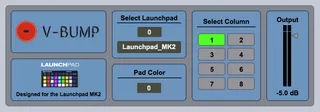
The V-Bump is a volume controlling device using the buttons of the Launchpad Mk2. The bottom two rows of the User 2 page become Up/Down buttons increasing or decreasing the volume of it's track 1dB per one "bump" of the pad.
To use:
- Place the V-Bump as the last plugin on your track of choice
- Select your column and pad color.
- When "bumping" up or down the pads will both flash white when they reach the default of 0dB.
- Press both pads simutaneously to reset the V-BUMP to 0dB.