- Type
- MIDI Effect
- Author
- herrmutt
- Version
- 3.7
- License
- AttributionNonCommercial
- Live version
- 9.5
- Max version
- 7.0
- Downloads
- 6,284
- Updated
- 2015-11-21
Beat Fader is a MIDI Effect for Ableton Live by herrmutt, distributed as Creative Commons Attribution-NonCommercial. It targets Live 9.5 and Max 7.0. On maxforlive.com it has 6,284 downloads. First published 2011-01-10, last updated 2015-11-21. 9 user comments below.
New to Max for Live? Read what MIDI Effects do, what the AttributionNonCommercial license means, how to install a device.
Description
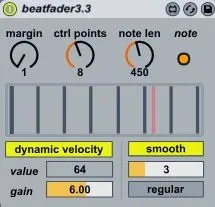
Play a full drum set moving only one midi cursor.
You can set the number of control points distributed along the fader between 2 and 16.
0 Map your fader to the huge fader or set the cc number in monitor in mode.
1 Everytime the fader's cursor passes over one of these control points, a corresponding note is
trigged. For each control point the midi note number sent out is different when descending
than ascending. Therefore in for four control points, eight different note numbers
will be sent, triggering eigth 'events' that could be samples or whatever you want.
the position of the control points is set using a 'margin'. If the margin is 10 the first
control point will lie at value 10 and the last control point will lie at value (127-
10)=117. The non-extremum control points are regularly distributed in the (10-127)
range.
2) the velocity of outputted midinotes can be either 'fixed to a value' or calculated in
real-time following the cursors's moves.
This control brings up a additional touch of
expressivity.
3)note length can be set to a desired value.
video demos:
http://www.youtube.com/watch?v=tgIosccwlA0
Comments (9)
But Dude, a bit more explanation on how to set this and Lobby up would be helpful. The Ableton set was some help but not so much with 3.1.
Don't get me wrong please I am getting results but they are haphazzard at best.
Thanks for the excellent work on this fantastic patch.
I last FMd' your name just to see if you were putting any music out there and you guys are Siiickkkk!
Thanks for the sounds.
JR
It seems i have to work on gui and description ;)
thank you
crossing a control point induce a note.
very fast move at hih # of control points sometimes forgot notes