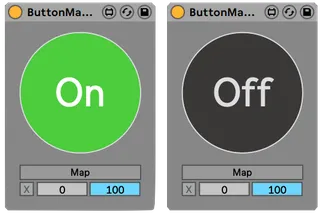
Simple One-Button Macro
A simple mappable On/Off button to trigger any parameter in ...
- Type
- Audio Effect
- Author
- surfingpikachu
- Version
- 2.0
- License
- None
- Live version
- 10.0.5
- Max version
- 8.0.0
- Downloads
- 1,073
- Updated
- 2019-04-04
Simple One-Button Macro is an Audio Effect for Ableton Live by surfingpikachu, distributed as freeware, with no license specified by the author. It targets Live 10.0.5 and Max 8.0.0. On maxforlive.com it has 1,073 downloads. Published 2019-04-04. 2 user comments below.
New to Max for Live? Read what Audio Effects do, how device licenses work, how to install a device.
Description
A simple mappable On/Off button to trigger any parameter in live.
Features:
• 1 (one) large MIDI-mappable button
• Adjustable Min/Max
---
--UPDATE V2 [04MAR19]--
--Changed the button so you can MIDI map it.
Comments (2)
It's a max audio effect currently, so I can only insert after an instrument.
It would be 10x more cool if you had a max midi effect version, so I can insert at the beginning of the chain to be able to switch on and off whole racks or devices ...
Does anyone know of a way to fix that?