Sheet Trainer
Practice reading sheet music by identifying the notes on the...
- Type
- MIDI Effect
- Author
- rPhaserM
- Version
- 1.0.0
- License
- Attribution
- Live version
- 9.7.5
- Max version
- 7.3.4
- Downloads
- 883
- Updated
- 2019-04-24
Sheet Trainer is a MIDI Effect for Ableton Live by rPhaserM, distributed as Creative Commons Attribution. It targets Live 9.7.5 and Max 7.3.4. On maxforlive.com it has 883 downloads. Published 2019-04-24. 6 user comments below.
New to Max for Live? Read what MIDI Effects do, what the Attribution license means, how to install a device.
Description
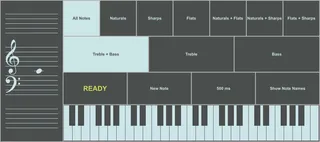
Practice reading sheet music by identifying the notes on the staves to the left.
Use the on-screen keyboard, or any MIDI one.
Place a MIDI instrument next to this device to hear the notes being displayed.
Open Ableton's Info View (bottom left panel) and hover your mouse over the buttons and parameters of this device to get a description of what they do.
The top row of buttons restricts which type of note is going to appear on the staves, and the second row is to restrict which clef they're going to appear in.
In the third row, from the left you have the status window, the "New Note" button, the note length slider, and the note name toggle for the on-screen keyboard.
Click on the staves to hear the displayed note agan.
----------
Only tested on Ableton 9.7.5, running Max 7.3.4, on Windows 7.
This device is provided as is, and I don't guarantee any warranty, tech support, bug fixes, or updates.
If you have any issue, feel free to let me know in the comments, but I can't promise you anything.
Comments (6)
As for your question, I'm not sure I understand what you mean. As long as you're in range you should be able to see your currently-pressed note on the staff. It's working on my end right now.
Although I'm still on Live 9 with Max 7, so could it be a version issue?
Is possible to make it chord mode also?
To practice chord sight reading!
Maybe in the not-so-near future, but at least for the time being I'm afraid I won't be able to help you.
Cheers.
Thank you so much!
If you have time please make a chord mode also !! maybe a payed version, who knows.
Anywhay! Thank you!!