Clip Navigation
This is a simple clip navigation tool. With it you can map ...
- Type
- MIDI Effect
- Author
- malikilam
- Version
- 1.2
- License
- None
- Live version
- 8.1.1
- Max version
- 5.1.0
- Downloads
- 1,158
- Updated
- 2011-02-10
Clip Navigation is a MIDI Effect for Ableton Live by malikilam, distributed as freeware, with no license specified by the author. It targets Live 8.1.1 and Max 5.1.0. On maxforlive.com it has 1,158 downloads. First published 2011-01-24, last updated 2011-02-10. 5 user comments below.
New to Max for Live? Read what MIDI Effects do, how device licenses work, how to install a device.
Description
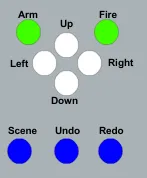
This is a simple clip navigation tool. With it you can map a midi pedal to the 9 Live buttons and
(a) move in between all of your available clip slots (i.e., up and down within a track and left and right between tracks),
(b) arm and disarm the Track you are on,
(c) fire any hi-lighted Clip,
(d) fire the selected Scene,
(e) undo any action, and
(f) redo any action.
This is my first attempt at programming a Max4Live patch. I found that I had to do a lot of things in the patch that seemed counter-intuitive to me in order to get it to work. So, any constructive advice that you can give will be much appreciated.
I must give credit to Sam Green for the inclusion of his M4L.api.ToggleArmSelectedTrack.maxpat (http://www.samgreene.com/drupal_samgreene/M4L-abstractions).
I'd love to have your feedback!
______________________________________
Update 1.1 :
When using Live to assign midi controllers or midi notes to the Live.buttons in this patch it seems that Live expects a Note On and a Note Off message. Because of that, you had to press any single midi message twice in order to change the clip slot.
The result was that if you were using a midi keyboard, it functioned as expected because you were sending a note on and a note off message with each key press and release.
However, if you were using a midi pedal which sent one message with each press&release, then you had to do that twice.
As I am using it with just such a midi pedal, I have now configured the Live.buttons to execute the move with one Note On message. I hope that makes sense.
_________________________________________
Update 1.2
I found a much simpler way to program the navigation using the Max For Live Abstractions, and I added the Scene Fire button, the Undo button and the Redo button.
Comments (5)
I am glad you are enjoying the patch.
I am unsure about some of your requests and bug reports. I think we are working with a language barrier.
Please feel free to write in your first language. I will translate using Google Language Tools. I think that will get us closer to understanding.
Cheers, Malikilam