Automation Crossfaders
This free device allows you to fade between different values...
- Type
- Audio Effect
- Author
- stev
- Version
- 1.0.1
- License
- AttributionShareAlike
- Live version
- 10.0.1
- Max version
- 7.3.5
- Downloads
- 0
- Updated
- 2019-12-16
Automation Crossfaders is an Audio Effect for Ableton Live by stev, distributed as Creative Commons Attribution-ShareAlike. It targets Live 10.0.1 and Max 7.3.5. First published 2019-12-02, last updated 2019-12-16. 3 user comments below.
New to Max for Live? Read what Audio Effects do, what the AttributionShareAlike license means, how to install a device.
Description
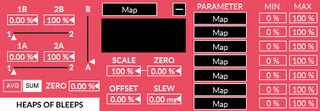
This free device allows you to fade between different values and then map those values to parameters in Live. This may sound boring at first, but it allows you to mix together different audio-rate envelopes or LFOs by mapping them to the 1A, 2A, 1B, or 2B, parameters and then using the A, B and AB faders to fade between them.
Automation can be averaged or summed when the fader is at the center. The summing can be done from a movable “zero” point. At 0% they add from the bottom up (this is good for envelopes). At 50% they add from the middle out (more like wave forms), and at 100% they subtract from the top.
Scale the automation, also from a movable “zero” point.
Offset the automation.
Smooth the automation.
Multimap fold-out tab for 7 extra MAP buttons with min and max control.
All parameters accept audio rate modulation, except parameters in the multi-map fold-out.
-Heaps of Bleeps
Comments (3)
from experience, this can be a big problem when using in live performances