a better search for max devices
PsuedoGroups screenshot

PsuedoGroups

by barstu

Drag this to a track to make that track act like it's part ...

View on maxforlive.com

Type
MIDI Effect
Author
barstu
Version
2.1
License
None
Live version
8.2.2
Max version
5.1.7
Downloads
411
Updated
2011-03-29

Description

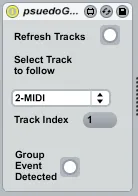
Drag this to a track to make that track act like it's part of a group. So say if I put it in track D and set it's track to follow to A, whenever I fire a cell in A it will fire the same row in D. It will also stop at same time.

I use this for when ever I don't want a track to appear under a group track and I want it visibly somewhere else in my set. Also get's around the limitation of no group tracks in group tracks

Comments (11)

  • lek · March 29 2011
    very interesting device.
  • lek · March 29 2011
    ooops, crash 8.2.1, and doesn't show up track selection box
  • barstu · March 29 2011
    Sorry to hear that, I just tried again on 8.2, mine isn't crashing. I'm gonna stick the beta on my machine later on so I'll try that.
    Try the refresh tracks button? I'm guessing you have already.
  • barstu · March 29 2011
    OK I've tried it with the beta and it still worked for me. I have a feeling it is the track dropdown. It is using a component that maybe wasn't included. I have frozen the amxd. Hopefully that will help.
  • lek · March 30 2011
    ok works for me now. But why can I just put the device on a midi track? why not audio?
  • barstu · April 08 2011
    I've uploaded an audio version here http://www.maxforlive.com/library/device.php?id=609
  • barstu · April 10 2011
    Note Only the 1st stop cell press gets reproduced. This is because, in the API, every subsequent stop cell press does not return the source row index. To work around this use a blank clip to trigger cells across the psuedo group.
  • bogumil · May 25 2015
    cool. idea ! great device. it works fine with the mouse but sometimes work and sometimes doesn't with the Push. wondering why?
  • bogumil · May 25 2015
    .. same thing with launchpad. iat first i was thinking maybe it's because i also have selected those devices as a midi input in properties, but it doesn't seems to be the issue
  • barstu · May 26 2015
    Hi I'm not sure unfortunately as I don't own either device. I can only assume it's because they are control surfaces and are interacting with the clips in a non-standard way.
  • bogumil · May 26 2015
    thx! shame i can't programme in max :(

← Back to search