Treasure Map BETA
Treasure Map lets you MIDI map functions that are natively n...
- Type
- MIDI Effect
- Author
- zimo3000
- Version
- 0.1
- License
- None
- Live version
- 10.0.1
- Max version
- 7.3.5
- Downloads
- 0
- Updated
- 2023-05-01
Treasure Map BETA is a MIDI Effect for Ableton Live by zimo3000, distributed as freeware, with no license specified by the author. It targets Live 10.0.1 and Max 7.3.5. First published 2020-03-10, last updated 2023-05-01. 5 user comments below.
New to Max for Live? Read what MIDI Effects do, how device licenses work, how to install a device.
Description
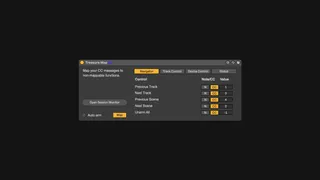
Treasure Map lets you MIDI map functions that are natively non-mappable or hidden in Ableton. It makes MIDI controllers more useful and a little closer to what you'd be able to do with a Push.
Mappable functions
— — — — — — — — — — —
- Navigation: previous track, next track, previous scene, next scene, unarm all tracks
- Selected track control: arm selected track, selected track on/off, solo selected track
- Device control: select previous device, select next device, selected device on/off
- Clip and global controls: fire slot, quantize selected clip, delete selected clip, stop selected clip, duplicate selected clip to next empty slot, record in selected slot for 1/2/4/8 bars, undo, switch between clip/device view
How to use it:
— — — — — — — — — — —
1. Create an empty midi track and add Treasure Map on it as a MIDI device
2. Set the Monitor of the midi track to "In". It's needed so that Treasure Map can listen to the MIDI notes and CC messages no matter which track is armed
3. Click on the "Map" button to open the panel where you can assign MIDI notes or CC messages to certain functions in Ableton. (Yeah you need to enter midi values manually… You can use M4L MIDI Monitor device to... um... monitor MIDI.)
This device does NOT mess up your undo history by filling it up with “Undo change” entries ;)
More info here: https://www.peterzimon.com/treasure-map/
Comments (5)
i m wondering:
- why don't you make the functions mappable? like the classical way of having buttons/knobs on the m4l surface which are mappable via Ctrl+M
- will you some day include the Fader and Send section? That would be awesome. Because i m using a Touch OSC software (OSC/Pilot) and could then control and midi-assign the "selected track" Fader and 3 Send-Knobs, Mute, Record-Arm, Solo.
Thank you , have a nice day :)
https://zimo3000.gumroad.com/l/HqpVH