- Type
- MIDI Effect
- Author
- protocol
- License
- AttributionNonCommercialShareAlike
- Live version
- 8.2.2
- Max version
- 5.1.8
- Downloads
- 1,126
- Updated
- 2012-12-21
NordLead2x3 is a MIDI Effect for Ableton Live by protocol, distributed as Creative Commons Attribution-NonCommercial-ShareAlike. It targets Live 8.2.2 and Max 5.1.8. On maxforlive.com it has 1,126 downloads. First published 2011-04-05, last updated 2012-12-21. 10 user comments below.
New to Max for Live? Read what MIDI Effects do, what the AttributionNonCommercialShareAlike license means, how to install a device.
Description
UPDATE: SAVES Presets within patch!
Have a JSON file to load into preset upon request by email: [email protected]. It only has 7 patches but will give you a better idea of what you can do.
Control NordLead2x's every parameter via patch (except arp, cause who really cares about the arp when Abletons is way better anyways!)
If you make new presets with patch, please save do share with me via email and I will include with download so others can share your awesome work: carbonmanifesto (at) gmail (dot) com
UPDATE for Mu Nord Lead 2x Patch:
Changes:
- Load Preset 1 on loading amxd max patch instead of blank.
- Lemur follows movement within amxd max patch main menu.
- Fixed bug on changing the midi input.
- Multisliders now move faster (no lag).
If you find a bug, let me know and i'll try to fix it.
Thanks,
Protocol
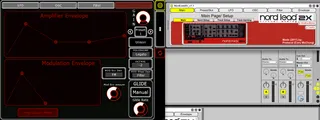
Also, this patcher was originally designed for use with Lemur.Mu (as seen in the screenshot), however this can be used as a regular patcher too. If you want to download associated Lemur.Mu stuff to go to:
http://www.jazzmutant.com/lemuruser_moduledetails.php?id=205
Lastly, if you have any issues or problems email me at the address indicated above.
Have fun and please do share!
Protocol
Comments (10)
That way it may give you an idea of what you can do for your patches too.
minor changes except that it now loads preset 1 on load. and the basic present's sound is now a basic lead sound, easier to manipulate for creating your own riffs.
hope you enjoy, let me know if there are any issues!
any possibility this would work with nord lead 2??
thanks
I dunno, you'd have to compare the midi cc's btw the devices. I would think they're the same but to make sure i'd check the manuals and compare midi cc's. if they're the same it'll work, but they're not you'll have to edit the patch by renaming the objects.
If it works let me know cause then i can rename it as just NordLead2 (which would encompase 2x as well).
Hi, it also works with a NordLead2!
Thank you very much for the patch! Great work!
Great to know! You're welcome, glad you're enjoying it!
What i want is:
- be able to save patches outside of the synth (since mine can hold only 40 userpatches). This seems to work with this device.
- be able to save selected patches in an ableton track, so i can load a track and start immediately. I think this is how the device works, can you clarify on this? How does it work exactly, are the stored patches shared when i use the device in separate tracks?