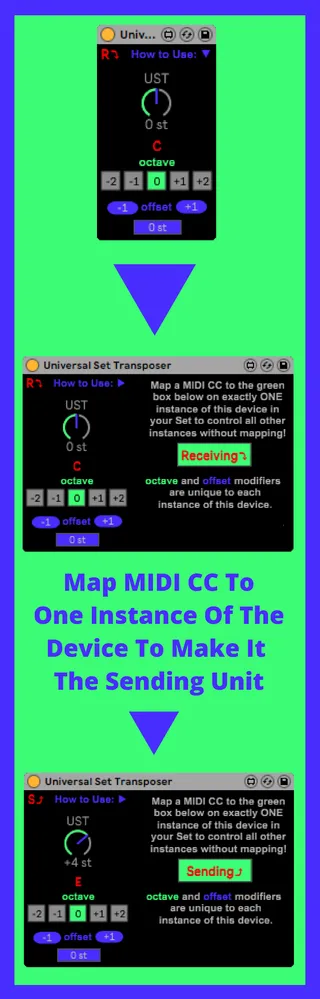
Universal Set Transposer
This device will allow you to transpose multiple MIDI tracks...
- Type
- MIDI Effect
- Author
- wagoglin
- Version
- 1.3
- License
- None
- Live version
- 10.1.6
- Max version
- 8.1.4
- Downloads
- 512
- Updated
- 2020-06-07
Universal Set Transposer is a MIDI Effect for Ableton Live by wagoglin, distributed as freeware, with no license specified by the author. It targets Live 10.1.6 and Max 8.1.4. On maxforlive.com it has 512 downloads. First published 2020-05-20, last updated 2020-06-07. 9 user comments below.
New to Max for Live? Read what MIDI Effects do, how device licenses work, how to install a device.
Description
This device will allow you to transpose multiple MIDI tracks in a Live set without the need to map each one by hand every time as you might with the stock "Pitch" device from Ableton.
Simply map a MIDI CC on EXACTLY one instance of this device and all other instances will automatically inherit it's transposition value!
I included convenient octave switchers and a pitch offset (typically for samples with roots other than C) as those are the two other things I frequently find myself using the stock pitch device for.
Let me know if you guys find any bugs too, this is my first M4L device.
CHANGELOG
V1 (5/20/2020):
Initial release
V1.1 (5/21/2020):
- Reduced Device latency from 1.5ms to 0ms
- Adjusted device so that only 1 entry is made into the undo log per key change rather than 20+
(Thanks 16x16 !!)
V1.2 (6/6/2020):
- Fixed the fact that MIDI control data like Pitch Bend and ModWheel weren't working with this device! (Thanks mackoall!!)
- Major overhaul of the Patching Mode View with lots of notes as to why I did certain things, hopefully could be useful to other beginners like me!
V1.3 (6/7/2020):
Sorry for such frequent updates! I think Max for Live 8.1.4 broke some things so I had to fix new bugs today! I decided to add some stuff too while I was at it.
anyways here the patch notes:
- Re-worked the internal octave control to a more simple and robust design, I believe the new M4L version 8.1.4 broke the old design.
- New instance creation of the device will not reset all others back to 0 st now so if you drag a new one onto a MIDI channel, the rest of the set stays transposed.
- Added a Sending&Receiving Icon to the initial view of the device in case you forget which one you have set as your sending unit like I have several times lol!
- Reworked the MIDI CC Mapping box to make a little more sense visually, it now just says whether the unit is sending or receiving rather than being a redundant transposition value.
Comments (9)
Thank you a lot for great device. I've looked for some simple way to be able to globally change keys in Live (for pretty long time actually). This device does it very well.
Talking about bugs.
I have noticed that UST introduces a little bit of latency to notes in clip. It shifts notes just a tiny bit. Usually it's not a problem but if using Arpeggiator this desync is enough to make it miss a first note each time chord changes.
As side-effect of this since first note is missed the whole sequence of notes is shifted
I uploaded screenshots to help you understand what's going on
https://imgur.com/a/9ODokCJ
Really hope this bug can be fixed because other than that, device works like a charm, thanks for your work.
Good job and good luck!
Has anyone else had this issue?