Clip Launcher
Use this device to launch up to three specified Ableton Live...
- Type
- MIDI Effect
- Author
- VKondakoff
- Version
- 1.0
- License
- Commercial
- Live version
- 10.1
- Max version
- 8.1.4
- Downloads
- 0
- Updated
- 2020-06-11
Clip Launcher is a MIDI Effect for Ableton Live by VKondakoff, distributed as a commercial (paid) device. It targets Live 10.1 and Max 8.1.4. First published 2020-05-20, last updated 2020-06-11. 2 user comments below.
New to Max for Live? Read what MIDI Effects do, what the Commercial license means, how to install a device.
Description
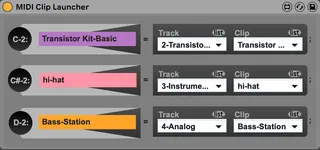
Use this device to launch up to three specified Ableton Live audio or MIDI clips by pressing C-2, C#-2 or D-2 notes on your MIDI controller or Computer MIDI keyboard.
I created this Max for Live device because I wanted to be able to launch Ableton Live clips using Computer MIDI keyboard, which is currently impossible in Ableton Live.
Usage: drop Clip Launcher to an Ableton Live MIDI track and select MIDI/Audio tracks and clips by pressing small ‘list’ button near the corresponding Track/Clip dropdown menus. Choose up to three clips to launch. Make sure the track, where MIDI Clip Launcher resides is armed (record-enabled) to be able to receive MIDI input. Now press C-2, C#-2 or D-2 notes on your MIDI controller or Computer MIDI keyboard to launch specified clips. You can record your performance to the Ableton Live sequencer for further playback.
Clip Launcher was tested to work in Ableton Live 10.1/Max 8.1.4 (macOS Catalina/Windows 10).
Short video:
https://youtu.be/8hAAfBO-s30
Price: $1
Version 1.0 (May 2020)
- Initial release
My other M4L devices: https://gumroad.com/valery_kondakoff
Comments (2)