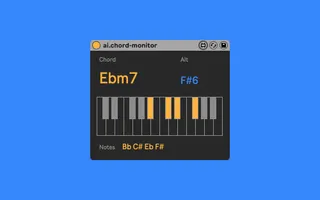
ai.chord-monitor
Monitor midi notes and find corresponding chord name and alt...
- Type
- MIDI Effect
- Author
- anthonyivol
- Version
- 0.3
- License
- None
- Live version
- 10.1.14
- Max version
- 8.1.3
- Downloads
- 3,350
- Updated
- 2021-04-02
ai.chord-monitor is a MIDI Effect for Ableton Live by anthonyivol, distributed as freeware, with no license specified by the author. It targets Live 10.1.14 and Max 8.1.3. On maxforlive.com it has 3,350 downloads. First published 2020-05-22, last updated 2021-04-02. 8 user comments below.
New to Max for Live? Read what MIDI Effects do, how device licenses work, how to install a device.
Description
Monitor midi notes and find corresponding chord name and alternative. An implementation of pychord notes_to_chord method in max/msp.
0.3 - Fix the undo issue
Comments (8)
thanks for this device! It is sleek and SO helpful. Any chance that a future iteration may be able to interpret chord inversions?
cheers n' blessings,
G
Is it possible to make the plugin output a specific note based on a input chord?
What i'm looking for is to be able to map that specific midi note to a scene and whenever i play a chord that specific scene to be triggered.
@GarrettNorvell, there is actually alternative chords name and so inversions displayed in smaller on the side under "ALT", but indeed the lowest pitch is not interpreted as the root note, I will try to do that in a next version.
@echapus I don't know what is the Piano Roll, you can show the instrument and effect in both the sequencer and arangment view by clicking on the corresponding track.
@trex20xx This would be an other device this one just find chords, the one you describe would take notes parameters and when all that notes where pressed it would trigger an other note, this is too far from the original device sorry.
So, I'm already happy, but if you are still going to tweak it at some point, here are my two cents:
1) It doesn't recognize open voicings where the minor/major third is played from a different octave. For example: C4-G4-E5 isn't recognized as a C Major chord. You can play the fifth or root as high or low as you want, but not the third. Maybe there's a logical reason for this that I'm not immediately seeing.
2) Added tones are recognized as long as there's a triad and the added tone is outside the triad (add9 & add11). I think it would be nice if it also recognized add2 and add4 (which are basically add9 and add11 played inside the triad), because those are not uncommon, I think. I'm not a theory master though, but I do sometimes use them.
3) I'm happy about the dark background of the device, because I use the new version 11 Dark theme. It's *almost* the same shade, but not quite... Would it be possible for the device to simply use the background color in the selected Live theme? I guess that would require tweaking all the colors so that they're visible in lighter themes, so maybe that's too much work. But maybe the bg color could at least match the Dark theme color, because it's already so close? :-)
Once again thank you, I don't want to appear to be complaining, it's already great :-)