ChordClipper
ChordClipper uses basic music theory to generate chord progr...
- Type
- MIDI Effect
- Author
- JimmyBollox
- Version
- 1.0
- License
- Attribution
- Live version
- 10.1.14
- Max version
- 8.1.3
- Downloads
- 0
- Updated
- No Updates
ChordClipper is a MIDI Effect for Ableton Live by JimmyBollox, distributed as Creative Commons Attribution. It targets Live 10.1.14 and Max 8.1.3. Published 2020-05-19. 2 user comments below.
New to Max for Live? Read what MIDI Effects do, what the Attribution license means, how to install a device.
Description
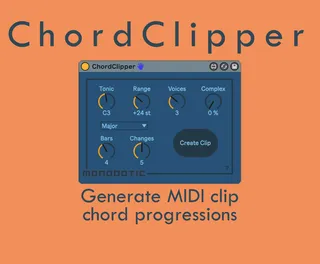
ChordClipper uses basic music theory to generate chord progressions and write them instantly to a MIDI clip.
Demo video: https://www.youtube.com/watch?v=zQeHKk27GaA
The CREATE CLIP button generates a new MIDI clip in the highlighted slot of Live’s session view. ChordClipper will overwrite any notes if there is an existing clip. This allows ChordClipper to be used 'on the fly' to create new progressions while playing live.
TONIC sets the key and lowest root note of the generated chord progression.
BARS sets the length of the clip loop immediately.
CHANGES sets the number of chord changes within the clip.
RANGE sets the highest possible note relative to the tonic.
VOICES sets the maximum number of notes in a chord.
COMPEX affects the chord structures. Low values will produce simple triads with some 7th and 9th chords. Higher values will create more exotic and inverted chords. If COMPLEX is high and RANGE/VOICES is low, the generated clips are more likely to have gaps and single notes playing.
Requires Ableton Live 10 & Max for Live 8
Comments (2)