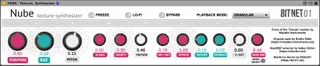
Nube - Texture synthesizer
Clone of the ‘Clouds’ module by Mutable Instruments ...
- Type
- Audio Effect
- Author
- cipp0
- Version
- 2.0
- License
- None
- Live version
- 11.1
- Max version
- 8.2.0
- Downloads
- 0
- Updated
- 2022-04-23
Nube - Texture synthesizer is an Audio Effect for Ableton Live by cipp0, distributed as freeware, with no license specified by the author. It targets Live 11.1 and Max 8.2.0. First published 2020-06-26, last updated 2022-04-23. 21 user comments below.
New to Max for Live? Read what Audio Effects do, how device licenses work, how to install a device.
Description
Clone of the ‘Clouds’ module by Mutable Instruments
This free MaxForLive device was made using the “vb.mi.clds~” OSX external by Volker Böhm, whom we thank so much for porting the original code to Max-MSP.
I’ve only created a UI for M4L to allow everyone to integrate this tool into their set-ups.
A huge thanks goes to Émilie Gillet, the original authoress of the Mutable Instruments module family, for making the sources publicly available for people to explore, learn and derive new musical textures!
I did it for passion, not for profit, therefore there may be bugs. we will discover them together!
Comments (21)
Full support to BitNet01 & cipp0!!!
1. Run this terminal command on the file: xattr -d com.apple.quarantine [path/to/extern.mxo] (see for details: https://cycling74.com/articles/using-unsigned-max-externals-on-mac-os-10-15-catalina)
2. Make a modification to the max patch by opening up the patch editor and typing into a text box and deleting it or anything else that doesn't modify the workings of the patch.
3. Save it. It should now work.
I was literally making a jump as I discovered it and was a little bummed as I saw that it doesn't function.
If you don't have the resources to use / test on a Mac, hit me up, ill gladly do what I can with my limited knowledge, if there is anything to do to make it work.
Thanks a lot for your efforts to bringing more music to the people.
Best wishes !
@ aoxomoxoa23 to modulate the parameters you have to map the number not the knobs!
https://www.instagram.com/p/CcvDYFaj18w/
in this thread: https://cycling74.com/forums/-sharing-mutable-instruments'-plaits-module-macro-oscillator
when i open up your patch in m4l it says: "vb.mi.clds~: vb.mi.clds~: No such object"
but i cant see any way to add/swap change the external (because im not very good at m4l haha). I have an m1 version of the file: vb.mi.clds~.mxo
1. Download this patch and place on a channel in ableton.
2. Download the M1 externals from this link: https://cycling74-web-uploads.s3.amazonaws.com/532091d1782ba55b54131523/2021-12-10T19:01:46Z/vb.mi-macOS-Fat-externals.zip
3. Unzip externals, open a terminal window and type: xattr -cr [path to recently unzipped externals folder]
4. double click the file vb.mi.clds~.mxo and it will be added to max.
5. the plugin should now run (its missing knobs on my computer but i can still control it using the text numbers)