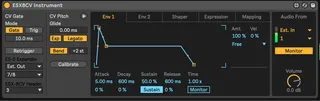
ESX8CV Instrument
Hack of the Ableton CV tools to work with Expert Sleepers ES...
- Type
- Instrument
- Author
- bhenry1790
- Version
- 1.0
- License
- None
- Live version
- 10.0.1
- Max version
- 7.3.5
- Downloads
- 587
- Updated
- 2020-12-19
ESX8CV Instrument is an Instrument for Ableton Live by bhenry1790, distributed as freeware, with no license specified by the author. It targets Live 10.0.1 and Max 7.3.5. On maxforlive.com it has 587 downloads. First published 2020-06-28, last updated 2020-12-19. 5 user comments below.
New to Max for Live? Read what Instruments do, how device licenses work, how to install a device.
Description
Hack of the Ableton CV tools to work with Expert Sleepers ESX-8CV Expander
Set Ext. Out to the stereo pair for your ES-5, then set the header to ESX-8CV
ESX-8CV Outputs:
1 = 1v/Oct
2 = Gate
3 = Envelope 1
4 = Envelope 2
5 = MIDI Expression 1
6 = MIDI Expression 2
7 = MIDI Expression 3
8 = Shaper
You'll need to add the es*encoder~ externals to Max for these to work.
https://www.expert-sleepers.co.uk/downloads.html
On a Mac the location for externals (windows will be similar):
Users/Shared/Max 8/Library/
If using with an ES8/9 as an aggregate device turn off DRIFT CORRECTION
Comments (5)
Great device!
Little bug report:
Unfortunately it is not possible to select the ES5 itself so set the expander output to 1...
First I wanna say thank you for all your great work!
I have a question......
Could you maybe make a version if the ESX8CV Instrument that can choose what outputs are used? This way we could for example use just 4 outputs on one expander with pitch, gate, env 1 and env 2 and leave the other outputs for other things or to have 2 synths voices controlled from one expander. Would love to have a dropdown menu for each output. I almost never use all 8 for voice.
This would save so much extra wiggling with extra channels and the track helper. all would be so much more organized. Think about it
However, there is a workaround! You can use the standard CV-Instrument and send the Audio Outs to the ESX8CV Track Helper. This method will allow you to use any combination of devices on the outputs.
Let me know if you have any troubles and I can make a step-by-step video tutorial