- Type
- Instrument
- Author
- keikusama
- Version
- 1.0.1
- License
- None
- Live version
- 10.1.14
- Max version
- 8.1.4
- Downloads
- 1,029
- Updated
- 2020-06-27
Selection Sampler is an Instrument for Ableton Live by keikusama, distributed as freeware, with no license specified by the author. It targets Live 10.1.14 and Max 8.1.4. On maxforlive.com it has 1,029 downloads. First published 2020-06-13, last updated 2020-06-27. 3 user comments below.
New to Max for Live? Read what Instruments do, how device licenses work, how to install a device.
Description
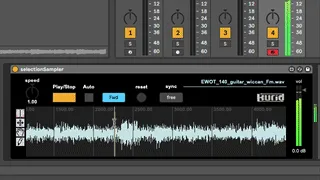
Selection Sampler is simple M4L sampler device.
Direction of the mouse drag selection toggles forward/reverse playback.
auto : The Mouse down action begins to play.
reset : If you want to play whole sample, then click it.
sync : In "grid" mode, your selection is limited to a length of sixteenth-note units.
cmd (win ctrl) + drag vertically : Zoom in/out sample.
cmd (win ctrl) + drag horizontal : Move display area in/out sample.
ctrl (win alt) + drag horizontal : Move selection back & forth
--------
2020.06.27 update : Switched object from "live.remote~" to "line~". more simple.
--------
Are you interested in this device?
Or you like it?
Please check our other devices :
https://gumroad.com/keikusama
Comments (3)
I run it on Mac OS (10.15.5) and there is no values under the pitch knob. Can you fix this, please?
Sorry, I don't have Mac running 10.15.5. So I couldn't test your issue.
anyway I update around "speed knob".
If you still have any problem, report me.