- Type
- Instrument
- Author
- 10T5
- Version
- 1.0
- License
- None
- Live version
- 10.1.14
- Max version
- 8.1.5
- Downloads
- 441
- Updated
- 2020-08-13
DFAM Advance is an Instrument for Ableton Live by 10T5, distributed as freeware, with no license specified by the author. It targets Live 10.1.14 and Max 8.1.5. On maxforlive.com it has 441 downloads. First published 2020-06-17, last updated 2020-08-13. 2 user comments below.
New to Max for Live? Read what Instruments do, how device licenses work, how to install a device.
Description
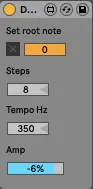
1- Set root note (midi note, only to have a visual reference)
2- Set an ext audio output in Ableton and plug it into the DFAM patch bay ADV / Clock plug (you can adjust the Amp parameter to feat the 5V CV standard if needed)
3- Play the DFAM as a synth with your keyboard, or with a midi sequence on Ableton. You have now the control over the eight steps!
You can play with the step number to introduce offsets, or slow up the tempo in Hz to produce happy accidents ...
The Tempo Hz param sets the frequency of a Phasor witch drives a tempo object. On every bang it trigs a gen patch witch produces the trigger for the Adv/Clock input on the DFAM. So adjusting frequency may decrease the drifting effect (witch may be interested as well...). Keep in mind that "The TEMPO knob sets the Sequencer playback speed, which is continuously variable from .7Hz to 700Hz. Assuming each step represents a 16th note, the Tempo can be set from roughly 10 BPM to about 10,000 BPM." (manual page 23), so the "best" setting is around 350 Hz.
https://www.youtube.com/watch?v=Zz9f43583Cc
As for M4L CV tools, you'll need a DC coupled sound card.
Some users report that it works only on their system if DFAM Advance is opened in Max for Live... A workaround if you are facing an issue ;-)
Works also on Ableton Live 9
Comments (2)