y-Chord Sequencer
The y-Chord Sequencer is similar to the SH-101 sequencer, ex...
- Type
- MIDI Effect
- Author
- redhexagonal
- Version
- 1.1
- License
- Commercial
- Live version
- 10.1.15
- Max version
- 8.1.5
- Downloads
- 0
- Updated
- 2020-10-21
y-Chord Sequencer is a MIDI Effect for Ableton Live by redhexagonal, distributed as a commercial (paid) device. It targets Live 10.1.15 and Max 8.1.5. First published 2020-07-09, last updated 2020-10-21. 2 user comments below.
New to Max for Live? Read what MIDI Effects do, what the Commercial license means, how to install a device.
Description
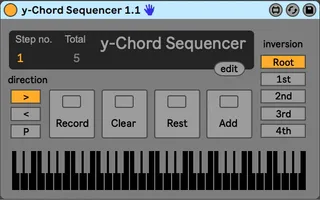
The y-Chord Sequencer is similar to the SH-101 sequencer, except it sequences chords of any number of notes. Its similar to the JX3P sequencer.
Press "Record", play a chord you like into the device and hold it, then press "Add" to write the chord to a step, find another chord, press "add" again and so on until you have built a sequence. Press "Rest" to add a rest. Press "Record" again to re-enter play mode.
The sequence can then be advanced by one step each time a midi note is received. the sequence will also be transposed, where C3 is zero transposition. Unlike many chord sequencers the y-Chord Sequencer can play more than one chord at a time, and won't send a note off until all chords which use that note are released.
You can add more notes to the sequence by pressing "Record" again, or press "Clear"and you can start over again. You can play the sequence forwards , backward, or back and forth. If you press edit you can edit the notes in each step numerically.
There is also the option of playing your chords as a 1st, 2nd, 3rd or 4th inversion, which produces related harmonic sequences.
The device will start from the first step in the sequence when Live's transport is started.
The sequence of chords is saved with the device, so it will be loaded with your song, or can be saved as a preset.
Comments (2)